

Need help choosing the right UX Courses? Call us:
Boston: 781-376-6044
Philadelphia: 610-228-0951
Toll Free: 800-851-9237

Hands-on UX classes and UX training using Mac or Windows computers with a live instructor in the same classroom.
Reviews of our UX classes

UX classes rating:
5 stars from 128 reviewers
"I learned a lot about the UX process from the course. Great teacher." - Tina C
See all reviews for UX CoursesAll UX classes include
 Free retakes
 Detailed curriculum
 Live instructor
 Flexible rescheduling
 Certificate of Completion
UX courses and UX training
helps individuals and teams
create better websites & apps
AGI also offers UX Consulting Services and you can learn more about user experience courses in our UX News section.
UX Classes GSA
American Graphics Institute offers UX Classes under GSA contract 47QTCA19D003Y. As a GSA contract holder, UX training GSA pricing for federal agencies is available for both private and public UX workshops. Contact an American Graphics Institute representative for additional information or to register with GSA pricing for UX courses.
Night and Weekend UX Classes
In addition to our many weekday classes, American Graphics Institute also offers weekend and night UX courses. These options are listed within the course schedules listed above, or contact AGI for upcoming night and weekend dates.
Determining the best UX classes
If you are just starting out in the field of user experience (UX), the UX Design Principles workshop is a good starting point, as it provides a foundation for both user experience. This course helps anyone involved in the design or development process of websites, apps, and products. If you would like help deciding which UX class to take, or the best place to start learning UX, contact AGI for guidance or review the ten best UX classes.
What you'll learn in UX classes
UX courses start by teaching foundational principles and processes of user experience design. This includes understanding user needs, research, wireframing, prototyping, as well as aesthetic and design considerations. Participants in UX classes learn skills for designing websites, apps, interfaces - essentially anything with which humans interact.
Beginner UX Classes
In the introductory UX course, UX Design Principles, participants learn user experience design concepts and the UX workflow to build products effectively and correctly. The course also provides some essential design principles for effectively communicating and designing, including, form, space, UX typography, and color which are essential when overseeing the design of a user experience.
Intermediate UX Courses
In the intermediate UX classes, participants learn to use common UX tools including Sketch, Adobe XD, as well as Photoshop for UX. These courses teach common tools used in the user experience design process. These course also teach the best ways for user experience professionals to interface with development teams to allow for efficiency in the design and development process.
Advanced UX Courses
The advanced UX classes teach techniques for research, wire framing, prototyping, and building responsive web designs. These advanced UX courses teach skills for planning, designing, testing and implementing as part of the user experience design process.
Group and Corporate UX Training
For companies, groups and organizations wanting to learn UX, AGI offers custom user experience classes that can be tailored for your needs. The course content and curriculum are adjusted specifically to the needs of your organization, and can include content selected from the UX courses offered by AGI, or the training materials and curriculum can be developed specifically for your group.
Private UX Training
If you are looking for a private UX class for your group or yourself, any UX course can be delivered as a private UX workshop. Complete the contact form for private UX training or call 781-376-6044 to schedule a private course for you or your group.
UX Classes, Certificate, Degree, or Bootcamp
Because there are many options for learning user experience, it’s worthwhile to understand the difference between UX classes, certificates, and degrees. A UX class is a specific set of coursework covering certain topics in the field of UX. A UX certificate is an intensive training by a licensed or accredited organization providing foundational skills in the field. A degree will include additional coursework outside the field of UX. You can learn more by reading do you need a UX certificate or degree?
UX Classes Near Me
You can find UX classes near you, with live UX courses nearby, as well as live online UX classes you can join from your home or office. AGI also offers instructors that come to your location, making it easy to schedule UX training near you. With UX training available in many cities, there are several options for training, classes, and workshops, AGI helps you to choose the best options for learning UX that meet your location, schedule, learning preference, and budget while allowing you to obtain UX training near you. See all locations for UX classes or contact AGI for a UX course near you.
Why Learn UX
There are many benefits of learning UX. User experience is useful to learn for anyone involved in the process of designing, developing, planning, or managing applications or websites. Learning UX provides the skills necessary to create apps and websites with fewer rounds of revisions that meet client needs and expectations. There is a consistent ROI for UX design processes implemented within organizations and teams, who see benefits with reduced development time, fewer revisions, and better apps and websites. There is a clear connection between how investments in UX increase profitability. The skills learned as part of UX courses are useful for product managers as well, who benefit by better understanding the processes and sequence necessary for efficient app design and development.
Learn UX for a New Career
Learning UX can serve as a starting point for a career creating apps, websites, and interfaces. Design skills are one component of what is needed. Skills with research, planning, organization, and prototyping are all necessary for most UX careers. UX careers require a well-rounded set of skills including an understanding of UX principles, along with related skills with tools such as Photoshop, Illustrator, and InDesign. Marketing and communications roles that use UX also require skills in communications and analytics.
Graphic Designers becoming UX Designers
Many graphic designers learn UX as a way to extend their existing design skills into the growing field of user experience. It is possible to transition from graphic design to UX design
Careers that use UX
There are many jobs and careers that use UX skills, including:
User Experience Designer
Web Designer
Product Manager
Web Developer
Information Architect
UX Researcher
UI Designer
Because UX skills are used for creating such a wide variety of projects, you may wish to read more regarding how to learn UX.
Become a UX Designer
A UX designer uses their skills to plan, organize, and design websites, apps, and interfaces.
The work of a UX professional involves significant research, planning, and architecting before starting the design process. The best UX design process generally starts with paper prototyping of UX designs, allowing for early stage planning before coding.
UX designers also have the responsibility of researching, preparing concepts, and refining them through testing and collaboration. The UX process is iterative, requiring UX designers to have strong communication skills and work well with teams.
UX designers have an average salary between $90,434 and $113,982 annually. Information about UX salaries in specific markets is available from indeed.com and glassdoor.com.
You can learn more about starting a career in UX.
UX Classes FAQ
Because there are many options for learning UX we have assembled a list of UX training FAQ along with their answers:
Can you teach yourself UX
While you can teach yourself UX using UX tutorials and UX books, the fastest way to learn UX is through UX classes, a UX certificate or UX bootcamp.
How do I become certified in UX
There are three options for becoming certified in UX, these include testing at a basic level, within a specialty, or completing a course of study. The independent, ISO standard UX certification exams are available without any coursework, although preparation courses do increase the likelihood of passing the exam. The option for obtaining UX certification through coursework involves more than 100 hours of study across 10 courses. You can learn more about the various UX Certification options and locations.
How long does it take to learn UX
You can learn the basic principles of UX design in a two-day course, although more in-depth skills are required to work in the UX field. A professional UX designer need at least 100 hours of classroom time and an equal amount of practice time. These can be obtained in a certificate or bootcamp program. Some schools now also offer bachelor’s degrees in UX, which take four years to complete.
Are online UX classes better than in-person UX classes
The live online UX classes are led by the same instructors that lead in-person user experience courses. The online class format allows participants to join into a live class that they might not be able to otherwise attend due to distance, travel time, or the need to work remotely.
If I’ve work in the UX field previously, do I still need an introductory class?
For those with no formal training, the introductory UX design principles course is the best place to start your formal UX education. The introduction class provides a foundation in core UX skills and principles necessary for creating apps, websites, and interfaces.
When can I take UX classes
You can attend UX classes in any month, as new classes are offered every 30 to 45 days, Both live online and live in-person courses are available.
Will learning UX help me get a job
Learning UX is the first step for gaining employment in the user experience design field. A range of course work and skills are needed. A certificate program or degree are generally required for gaining work in the UX field. Other skills are also useful, with coursework or a college degree in a related field such as business, psychology, or visual design.
How much do UX courses cost
Individual UX courses cost between $495 and $695, while a UX certificate program is $3,600. These fees are for courses led by a live instructor at a credible school such as American Graphics Institute.
Recent UX Courses Training News

Adobe (ADBE) and Figma have canceled the proposed merger following regulatory concerns raised by both U.S. and European regulators who concluded the merger would reduce competition and increase costs to consumers. The proposed…

Our team of User Experience (UX) design experts has assembled the best UX design courses and certificates for learning the process of creating great websites, apps, and interfaces. These UX design courses can be taken on their own or can serve as the starting point for a UX Certificate program.…
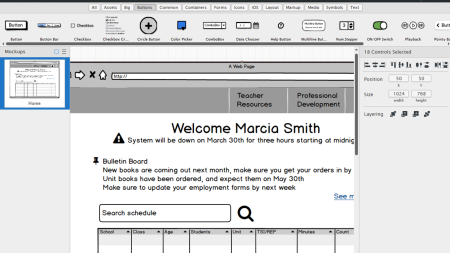
UX designers and software engineers are fortunate to have many prototyping tools for bringing their ideas to reality. The question is, which prototyping app is best for you? To find the best prototyping apps we compare Figma, Sketch, XD, and Balsamiq, the four most widely used prototyping apps…
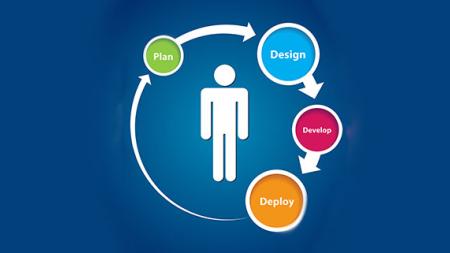
The user experience design process in an agile development environment supports the agile philosophy of iterating your work. With an agile development process, testing and revisions are ongoing, and the UX process is able to follow this same course. There are typically four phases to the user…
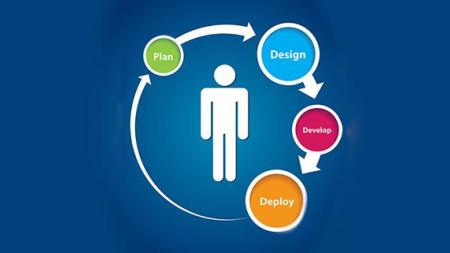
Websites and apps that work well are often complimented for having a great UX or fantastic UI. This article explores the difference between UX and UI. When you hear someone criticize or praise either the UX or UI of a site, they may appear to be using the terms interchangeably.…

With the important role that fonts play in user experience, it is surprising that a universal font that works across most languages, browsers, and operating systems doesn't yet exist. Google and Adobe are looking to change this as they are pushing forward with a method of creating a standardized…
AGI's team of experienced instructors are also the best-selling authors of more than 20 books including Creative Cloud for Dummies, Creative Suite for Dummies, and many books published by Adobe Press, Microsoft Press, and other major publishers. Learn from experienced professionals with extensive professional and training experience, who are also practicing professionals. For Federal agencies, American Graphics Institute classes are offered under GSA contract 47QTCA19D003Y.