Adobe training, UX Courses, and Photoshop Classes at AGI
American Graphics Institute
Secondary
  • Why AGI
  • About
  • Contact
  • Locations
  • All classes
  • Cart
  • Log in
Search
Search
Main menu
  • Classes & Workshops
    • Classes & Workshops
    • Column 1
      • Adobe Courses
      • Photoshop
      • InDesign
      • Illustrator
      • Premiere Pro
      • After Effects
      • Animate
      • Acrobat
      • Captivate
      • Creative Cloud
      • AI Classes
      • Copilot
      • Claude AI
      • Gemini
      • Animation
      • Motion Graphics
      • After Effects
      • Animate
      • Blender
      • Cinema 4D
      • Maya
      • Digital Marketing
      • Google Analytics
      • Google Tag Manager
      • HTML Email
      • Digital Marketing Certificate
      • Elearning
      • Captivate
      • Camtasia
    • Column 2
      • Figma
      • Figma Introduction
      • Advanced Figma
      • Figma Design Systems
      • Figma Bootcamp
      • Graphic Design Courses
      • Graphic Design Course
      • AI Graphic Design Course
      • Graphic Design Certificate
      • Graphic Design for High School Students
      • Canva
      • Data Visualization
      • Office Skills
      • Excel
      • Power BI
      • PowerPoint
      • Keynote
      • Access
      • Teams
      • Google Docs
      • Presentation Design
      • PowerPoint Design
      • Keynote Presentation Design
    • Column 3
      • UX Courses
      • UX Design
      • UX Research
      • Information Architecture
      • Rapid Prototyping
      • UX for Mobile & Touch
      • Figma
      • UX Certification
      • UX Design Certificate
      • Design Thinking
      • Video Editing Courses
      • Video Production
      • Premiere Pro
      • After Effects
      • DaVinci Resolve
      • Final Cut
      • Video Editing for High School Students
      • Web Accessibility
      • Web Accessibility
      • Section 508
      • Accessibility for Designers
      • InDesign Accessibility
      • MS Office Accessibility
    • Column 4
      • Web Design
      • WordPress Classes
      • HTML
      • CSS
      • Responsive Web Design
      • Web Design Certificate
      • Web Graphics
      • Web Design for High School Students
      • Web Development
      • Agile
      • CSS
      • HTML
      • JavaScript
      • Python
      • WordPress
      • 3D Design
      • 3DS Max
      • After Effects
      • Blender
      • Cinema 4D
      • Maya
      • Motion Graphics
      • Sketchup
      • See All Classes
  • Online Training
    • Online Training
    • Column 1
      • Adobe Classes
      • Photoshop
      • InDesign
      • Illustrator
      • Premiere Pro
      • After Effects
      • Animate
      • Acrobat
      • Captivate
      • XD
      • Creative Cloud
      • All Adobe
      • Digital Marketing
      • HTML Email
      • Google Analytics
      • Google Tag Manager
      • Digital Marketing Certificate
    • Column 2
      • Elearning
      • Captivate
      • Camtasia
      • Graphic Design
      • Graphic Design Course
      • Graphic Design Certificate
      • Design Thinking
      • Office Skills
      • PowerPoint
      • Keynote
      • Excel
      • Access
      • Google Docs
      • Presentation Design
      • PowerPoint Design
      • Keynote Presentation Design
    • Column 3
      • UX Courses
      • UX Design
      • Information Architecture
      • Rapid Prototyping
      • UX for Phone & Touch
      • Figma
      • UX Certification
      • UX Design Certificate
      • Video Editing
      • Premiere Pro
      • After Effects
      • DaVinci Resolve
      • Final Cut
      • Web Accessibility
      • Web Accessibility
      • Section 508
    • Column 4
      • Web Design
      • Web Design Certificate
      • WordPress
      • HTML
      • CSS
      • Responsive Web Design
      • Web Graphics
      • Web Development
      • JavaScript
      • HTML
      • CSS
      • Drupal
      • WordPress
      • CAD & 3D Design
      • Sketchup
      • 3DS
      • Maya
      • See All Classes
  • Certificate Programs
    • Certificate Programs
    • Column 1
      • Graphic Design Certificate
      • Video Editing Certificate
      • Digital Marketing Certificate
    • Column 2
      • UX Design Certificate
      • Web Design Certificate
      • Web Development Certificate
    • Column 3
      • Photoshop Certificate
      • All Certificate Programs
  • Adobe Training
    • Adobe Training
    • Column 1
      • Photoshop
      • InDesign
      • Illustrator
      • Animate
      • Acrobat
    • Column 2
      • Premiere Pro
      • After Effects
      • XD
      • Captivate
      • Connect
    • Column 3
      • Creative Cloud
      • Adobe Express
      • Dreamweaver
      • AEM Forms
      • InCopy
      • All Adobe Classes
      • See All Classes
  • Corporate Training

  • Why AGI
  • About
  • Contact
  • Locations
  • All classes
  • Cart
  • Log in
Breadcrumb
  1. Home
  2. Adobe Classes
  3. Creative Cloud Classes
  4. How To Use Adobe CC Libraries
How to use Adobe CC Libraries
We'll provide you personalized training options right away.

We never sell or share your information

Related Class
Adobe courses & Adobe training
Related Articles
Image
Figma course students working at a computer using Figma for a project.

Adobe - Figma merger canceled

Image
Adobe Courses and Adobe Training Classes in Florida

Training Grant: free training for Massachusetts employees & employers

Image
Adobe Courses and Adobe Training Classes in Florida

Using Bootcamp for Creative Cloud

How to use Adobe CC Libraries

  • Published on February 9, 2016
by Jennifer Smith
Image
How to use Adobe CC Libraries

Design professionals can use Adobe Creative Cloud (CC) libraries for many projects. Many designers can benefit from Adobe CC Libraries, an often overlooked tool in the Creative Cloud collection of apps. Adobe CC Libraries provide designers with a quick and easy method to find and access assets, dramatically speeding up production time. Whether building a UI for a website, creating marketing materials, or designing an identity, Adobe Creative Cloud libraries are a useful tool for designers. Here we look at when and how to use Adobe CC Libraries.

Adobe CC Libraries Background

Adobe Creative Cloud Libraries help designers that work with tools such as InDesign, Illustrator, and Photoshop. Libraries can be created using objects from any of these apps, then shared across the other Adobe CC apps for my own use or shared with other Creative Cloud users. Here’s an example of how a UI or UX designer may use Adobe CC libraries to improve their workflow.

How to Create Adobe CC Library

To create an Adobe CC library follow these steps:

  1. 1. When working in an Adobe CC app such as InDesign, choose Window > CC Libraries. The CC Libraries panel appears.
     
  2. 2. From the My Library drop-down menu at the top of the CC Library panel choose +Create New Library. Name the library and press Create.
     
  3. 3. Open your document and start collecting art and styles in the CC library. The library serves as a central location. You can use CC Library elements online and offline.
     
  4. 4. To add elements to the Adobe CC library, click on the asset in your Adobe CC document. If adding an image to your Adobe CC library, click the Add Graphic button, at the bottom of the CC Libraries panel. If selecting text, choose the character style, paragraph style, or colors to be added to the CC library

How to use Adobe CC libraries

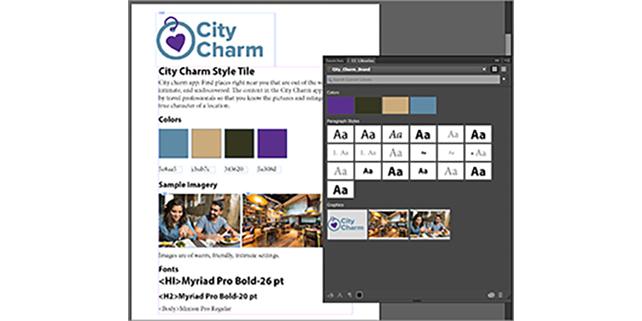
The CC Library panel recognizes selected items to make it easy to add them to your own Library.
Adobe CC libraries

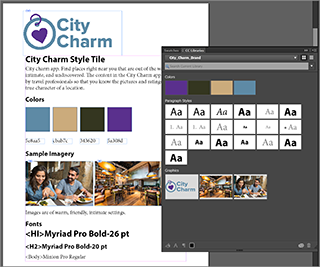
The CC Library after selecting items to be added from the sample style tile.


Once an Adobe CC Library is started, you can use it immediately in other apps that are part of your UX design workflow, such as Adobe Illustrator, Photoshop, or InDesign.

How to use an Adobe CC library in Creative Cloud applications

You can use the Adobe CC library within most of the Adobe Creative Cloud applications such as Photoshop, InDesign, and Illustrator. Here’s how to use an existing Adobe CC library within your Creative Cloud apps:

  1. 1. When working in an Adobe CC app, select Window > Libraries then choose the library you want to access from the Library drop-down menu.
     
  2. 2. The Library panel opens, you can do the following
  • Drag graphics right onto my artboard
  • Select colors right from the Library pane;
  • Select type styles right from the Library panel
  • Add additional artwork back into the Library and have it synced for easy access in other apps.
  • Delete and update graphics as needed.
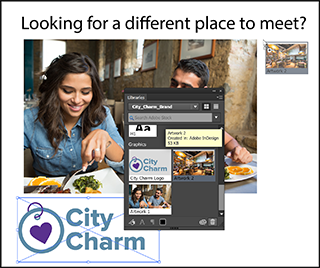
  • Drag and drop your elements right onto your Illustrator artboard.
Using Adobe CC library

An Adobe CC Library is a dynamic, editable resource for organizing and locating the latest assets used in projects without needing to search across a computer or server.

Designers that typically work in Photoshop can use and edit Adobe CC libraries as well.

Accessing Adobe CC Libraries in Photoshop

To access an Adobe CC library in Photoshop:

  1. 1. Selecting Window > Libraries.
     
  2. 2. After the library is open, grab other assets from the library and use them directly in your document.

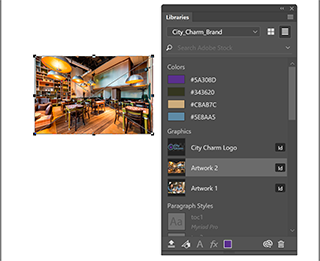
Type styles are not accessible within Photoshop as they were within InDesign.
Adobe cc library

Use the Adobe CC Library to access your graphics and colors in Adobe Photoshop.

Other interesting uses for Adobe CC libraries

Using an Adobe CC library also provides access to Adobe Stock imagery. You can search for the appropriate image without even leaving the Creative Cloud application you are using.

  1. 1. Enter the search term in the Search Adobe Stock textbox and press Return or Enter. The results are provided right in the content area of the Library panel.
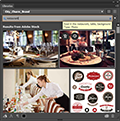
    Example of Adobe CC libraries
     
  2. 2. Click on the Save Preview to…library cloud button to add a watermarked image to your library. You can use this image right away and if you want to keep it,the image can be purchased.

    Example of adding an image using Adobe CC libraries

This has provided an overview of using Adobe CC libraries. You can learn more about working effectively with Creative Cloud applications in the Adobe Creative Cloud (CC) training classes offered at American Graphics Institute.

About the author

Christopher Smith is president of American Graphics Institute. He is the co-author of Adobe Creative Cloud for Dummies and more than 10 other books on design and digital publishing. He served as publisher and editor of the Digital Classroom book series, which has sold more than one million books on topics relating to InDesign, Photoshop, Illustrator, After Effects, Premiere Pro and other Creative Cloud apps. At American Graphics Institute, he provides strategic technology consulting to marketing professionals, publishers designers, and large technology companies including Google, Apple, Microsoft, and HP. An expert on web analytics and digital marketing, he also delivers Google Analytics classes along with workshops on digital marketing topics. Christopher did his undergraduate studies the at the University of Minnesota, and then worked for Quark, Inc. prior to joining American Graphics Institute where he has worked for more than 20 years.

Footer
  • 781-376-6044
  • CONTACT US
  • SEE ALL AGI TRAINING LOCATIONS

© Copyright 2002 - 2026 American Graphics Institute