

Adobe training, UX Courses, and Photoshop Classes at AGI
American Graphics Institute
Secondary
  • Why AGI
  • About
  • Contact
  • Locations
  • All classes
  • Cart
  • Log in
Search
Search
Main menu
  • Classes & Workshops
    • Classes & Workshops
    • Column 1
      • Adobe Courses
      • Photoshop
      • InDesign
      • Illustrator
      • Premiere Pro
      • After Effects
      • Animate
      • Acrobat
      • Captivate
      • Creative Cloud
      • AI Classes
      • Copilot
      • Claude AI
      • Gemini
      • Animation
      • Motion Graphics
      • After Effects
      • Animate
      • Blender
      • Cinema 4D
      • Maya
      • Digital Marketing
      • Google Analytics
      • Google Tag Manager
      • HTML Email
      • Digital Marketing Certificate
      • Elearning
      • Captivate
      • Camtasia
    • Column 2
      • Figma
      • Figma Introduction
      • Advanced Figma
      • Figma Design Systems
      • Figma Bootcamp
      • Graphic Design Courses
      • Graphic Design Course
      • AI Graphic Design Course
      • Graphic Design Certificate
      • Graphic Design for High School Students
      • Canva
      • Data Visualization
      • Office Skills
      • Excel
      • Power BI
      • PowerPoint
      • Keynote
      • Access
      • Teams
      • Google Docs
      • Presentation Design
      • PowerPoint Design
      • Keynote Presentation Design
    • Column 3
      • UX Courses
      • UX Design
      • UX Research
      • Information Architecture
      • Rapid Prototyping
      • UX for Mobile & Touch
      • Figma
      • UX Certification
      • UX Design Certificate
      • Design Thinking
      • Video Editing Courses
      • Video Production
      • Premiere Pro
      • After Effects
      • DaVinci Resolve
      • Final Cut
      • Video Editing for High School Students
      • Web Accessibility
      • Web Accessibility
      • Section 508
      • Accessibility for Designers
      • InDesign Accessibility
      • MS Office Accessibility
    • Column 4
      • Web Design
      • WordPress Classes
      • HTML
      • CSS
      • Responsive Web Design
      • Web Design Certificate
      • Web Graphics
      • Web Design for High School Students
      • Web Development
      • Agile
      • CSS
      • HTML
      • JavaScript
      • Python
      • WordPress
      • 3D Design
      • 3DS Max
      • After Effects
      • Blender
      • Cinema 4D
      • Maya
      • Motion Graphics
      • Sketchup
      • See All Classes
  • Online Training
    • Online Training
    • Column 1
      • Adobe Classes
      • Photoshop
      • InDesign
      • Illustrator
      • Premiere Pro
      • After Effects
      • Animate
      • Acrobat
      • Captivate
      • XD
      • Creative Cloud
      • All Adobe
      • Digital Marketing
      • HTML Email
      • Google Analytics
      • Google Tag Manager
      • Digital Marketing Certificate
    • Column 2
      • Elearning
      • Captivate
      • Camtasia
      • Graphic Design
      • Graphic Design Course
      • Graphic Design Certificate
      • Design Thinking
      • Office Skills
      • PowerPoint
      • Keynote
      • Excel
      • Access
      • Google Docs
      • Presentation Design
      • PowerPoint Design
      • Keynote Presentation Design
    • Column 3
      • UX Courses
      • UX Design
      • Information Architecture
      • Rapid Prototyping
      • UX for Phone & Touch
      • Figma
      • UX Certification
      • UX Design Certificate
      • Video Editing
      • Premiere Pro
      • After Effects
      • DaVinci Resolve
      • Final Cut
      • Web Accessibility
      • Web Accessibility
      • Section 508
    • Column 4
      • Web Design
      • Web Design Certificate
      • WordPress
      • HTML
      • CSS
      • Responsive Web Design
      • Web Graphics
      • Web Development
      • JavaScript
      • HTML
      • CSS
      • Drupal
      • WordPress
      • CAD & 3D Design
      • Sketchup
      • 3DS
      • Maya
      • See All Classes
  • Certificate Programs
    • Certificate Programs
    • Column 1
      • Graphic Design Certificate
      • Video Editing Certificate
      • Digital Marketing Certificate
    • Column 2
      • UX Design Certificate
      • Web Design Certificate
      • Web Development Certificate
    • Column 3
      • Photoshop Certificate
      • All Certificate Programs
  • Adobe Training
    • Adobe Training
    • Column 1
      • Photoshop
      • InDesign
      • Illustrator
      • Animate
      • Acrobat
    • Column 2
      • Premiere Pro
      • After Effects
      • XD
      • Captivate
      • Connect
    • Column 3
      • Creative Cloud
      • Adobe Express
      • Dreamweaver
      • AEM Forms
      • InCopy
      • All Adobe Classes
      • See All Classes
  • Corporate Training

  • Why AGI
  • About
  • Contact
  • Locations
  • All classes
  • Cart
  • Log in
Breadcrumb
  1. Home
  2. Design News
  3. Illustrator CC 2017 Review and New Features
Illustrator CC 2017 Review and New Features
We'll provide you personalized training options right away.

We never sell or share your information

Related Class
Illustrator CC 2017 Review and New Features
Adobe Illustrator Courses & Classes
Related Articles
Image
Illustrator CC 2017 Review and New Features

10 Best Illustrator Courses Online or In-Person

Image
Illustrator CC 2017 Review and New Features

Using Adobe Illustrator in architecture and building design

Image
Illustrator CC 2017 Review and New Features

What is Adobe Illustrator

Illustrator CC 2017 Review and New Features

  • Published on November 10, 2016
by Jennifer Smith
Image
Illustrator CC 2017 Review and New Features

Adobe has updated their professional drawing and illustration tool. As you will find in this Illustrator CC 2017 review, the new features borrow heavily from capabilities previously available in Adobe InDesign. Many InDesign users will see more convergence between the apps, which are now providing very similar functionality. As these are mostly incremental updates, they will be rolled into the Illustrator courses offered at American Graphics Institute.

New documents can now be created from either a blank canvas or templates that use artwork and illustrations. The new Illustrator templates provide starting points for customizing and creating your own artwork.

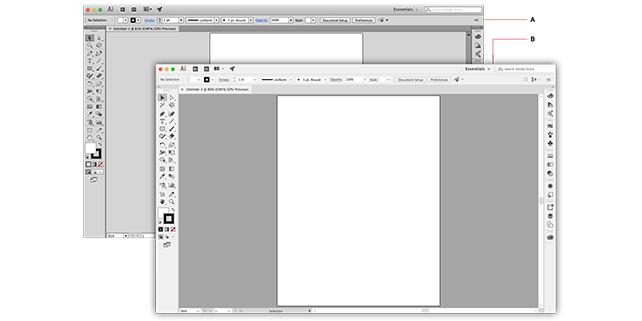
The user interface has been updated, with new icons for many of the tools, and the ability to change the background workspace color to either a lighter or darker color. This may help some users with vision impairments or simply reduce eye strain. Use the workspace customization options within the preferences to access these changes, just as within InDesign.

Another area where Adobe Illustrator CC 2017’s new features borrow heavily from InDesign is the handling of text. For example, InDesign has long included the ability to fill a text frame with placeholder text, and this capability is now also available in Illustrator.

The idea of importing text into a shape, such as the inside of a circle, will also be nothing new for users of InDesign that also work in Illustrator. Now Adobe Illustrator graduates to InDesign-level text-handling functionality by adding the ability to import text directly into a custom shapes, and also import text onto a path. While it was previously possible to place text onto a path or in an object, importing text directly from a file wasn’t an option until Illustrator CC 2017.

Locating fonts has also been made easier in Illustrator CC 2017 using functionality that also exists in InDesign. Font families can be marked as favorites with a star icon, or selected from a recently used fonts section that has now been added to Adobe Illustrator. Illustrator has made some new improvements to working with type, making it possible to narrow fonts by broad categories such as serif or sans serif, as well as locating visually similar fonts. Illustrator also provides a new font preview for any selected text by placing the cursor over a font name in list of available font list available fonts found in the Control panel or the Character panel.

Relating to fonts, you can also select special characters and symbols, such as variations on hyphens and dashes, white-space characters like the en dash or em dash, and characters that break a column or line. These options are available while working with text, either from the Type menu or the context menu in Illustrator CC 2017.

The zoom tool doesn’t generally get much attention, but there have been some refinements to the process of zooming in this version of Illustrator. Zooming now retains focus on selected object, just as within InDesign. If working on small objects, select them then increase the magnification, either via the keyboard or menu commands, and the display will center automatically on the selected object.

Adobe Illustrator has also improved the precisions with which layouts can be generated. Precision is especially useful for UX and UI designers who need to create artwork that is pixel-perfect. Adobe Illustrator CC 2017 adds the ability to align objects along with individual path segments and anchor points that comprise them. Objects can be drawn or created so that they align to the pixel grid, and retain this alignment when moved or scaled.

While the list of Adobe Illustrator CC 2017 new features is less than overwhelming, and is not likely to make it attractive to new users, it shows a set of incremental enhancements that benefit long-time Illustrator users.


About the author

Jennifer Smith is a user experience designer, educator and author based in Boston. She has worked in the field of user experience design for more than 15 years. She has designed websites, ecommerce sites, apps, and embedded systems. Jennifer designs solutions for mobile, desktop, and iOT devices. Jennifer holds a Master of Science (MS) degree in Human Factors in Information Design, a Bachelors degree with a concentration in Commercial Art. When not teaching at American Graphics Institute, Jennifer Smith is an adjunct professor at Boston University.

Jennifer delivers UX training and UX consulting for large Fortune 100 companies, small start-ups, and independent software vendors.She has served as a Designer in Residence at Microsoft, assisting third-party app developers to improve their design solutions and create successful user experiences. She has been hired by Adobe and Microsoft to deliver training workshops to their staff, and has traveled to Asia, Europe, India, the Middle East, and across the U.S. to deliver courses and assist on UX design projects. She has extensive knowledge of modern UX Design, and worked closely with major tech companies to create educational material and deliver UX workshops to key partners globally. Jennifer works with a wide range of prototyping tools including XD, Sketch, Balsamiq, Fireworks, Photoshop, Illustrator, and Blend for Visual Studio. She also works extensively in the fields of presentation design and visual design.

Jennifer is also an expert on Photoshop, digital image editing, and photo manipulation. Having written 10 books on Photoshop, and having consulted and provided training to major media companies and businesses around the globe.

Jennifer is the author of more than 20 books on design tools and processes, including Adobe Creative Cloud for Dummies, Adobe Creative Cloud Digital Classroom, and Photoshop Digital Classroom. She has been awarded a Microsoft MVP three times for her work with user experience design in creating apps for touch, desktop, and mobile devices. Jennifer holds the CPUX-F certification from the User Experience Qualification Board and assists others in attaining this designation in leading a UX certification course at American Graphics Institute.

Footer
  • 781-376-6044
  • CONTACT US
  • SEE ALL AGI TRAINING LOCATIONS

© Copyright 2002 - 2026 American Graphics Institute