Adobe training, UX Courses, and Photoshop Classes at AGI
American Graphics Institute
Secondary
  • Why AGI
  • About
  • Contact
  • Locations
  • All classes
  • Cart
  • Log in
Search
Search
Main menu
  • Classes & Workshops
    • Classes & Workshops
    • Column 1
      • Adobe Courses
      • Photoshop
      • InDesign
      • Illustrator
      • Premiere Pro
      • After Effects
      • Animate
      • Acrobat
      • Captivate
      • Creative Cloud
      • AI Classes
      • Chat GPT
      • Copilot
      • Claude AI
      • Gemini
      • Animation
      • Motion Graphics
      • After Effects
      • Animate
      • Blender
      • Cinema 4D
      • Maya
      • Digital Marketing
      • Google Analytics
      • Google Tag Manager
      • HTML Email
      • Digital Marketing Certificate
      • Elearning
      • Captivate
      • Camtasia
    • Column 2
      • Figma
      • Figma Introduction
      • Advanced Figma
      • Figma Design Systems
      • Figma Bootcamp
      • Graphic Design Courses
      • Graphic Design Course
      • AI Graphic Design Course
      • Graphic Design Certificate
      • Graphic Design for High School Students
      • Canva
      • Data Visualization
      • Office Skills
      • Excel
      • Power BI
      • PowerPoint
      • Keynote
      • Access
      • Teams
      • Google Docs
      • Presentation Design
      • PowerPoint Design
      • Keynote Presentation Design
    • Column 3
      • UX Courses
      • UX Design
      • UX Research
      • Information Architecture
      • Rapid Prototyping
      • UX for Mobile & Touch
      • Figma
      • UX Certification
      • UX Design Certificate
      • Design Thinking
      • Video Editing Courses
      • Video Production
      • Premiere Pro
      • After Effects
      • DaVinci Resolve
      • Final Cut
      • Video Editing for High School Students
      • Web Accessibility
      • Web Accessibility
      • Section 508
      • Accessibility for Designers
      • InDesign Accessibility
      • MS Office Accessibility
    • Column 4
      • Web Design
      • WordPress Classes
      • HTML
      • CSS
      • Responsive Web Design
      • Web Design Certificate
      • Web Graphics
      • Web Design for High School Students
      • Web Development
      • Agile
      • CSS
      • HTML
      • JavaScript
      • Python
      • WordPress
      • 3D Design
      • 3DS Max
      • After Effects
      • Blender
      • Cinema 4D
      • Maya
      • Motion Graphics
      • Sketchup
      • See All Classes
  • Online Training
    • Online Training
    • Column 1
      • Adobe Classes
      • Photoshop
      • InDesign
      • Illustrator
      • Premiere Pro
      • After Effects
      • Animate
      • Acrobat
      • Captivate
      • XD
      • Creative Cloud
      • All Adobe
      • Digital Marketing
      • HTML Email
      • Google Analytics
      • Google Tag Manager
      • Digital Marketing Certificate
    • Column 2
      • Elearning
      • Captivate
      • Camtasia
      • Graphic Design
      • Graphic Design Course
      • Graphic Design Certificate
      • Design Thinking
      • Office Skills
      • PowerPoint
      • Keynote
      • Excel
      • Access
      • Google Docs
      • Presentation Design
      • PowerPoint Design
      • Keynote Presentation Design
    • Column 3
      • UX Courses
      • UX Design
      • Information Architecture
      • Rapid Prototyping
      • UX for Phone & Touch
      • Figma
      • UX Certification
      • UX Design Certificate
      • Video Editing
      • Premiere Pro
      • After Effects
      • DaVinci Resolve
      • Final Cut
      • Web Accessibility
      • Web Accessibility
      • Section 508
    • Column 4
      • Web Design
      • Web Design Certificate
      • WordPress
      • HTML
      • CSS
      • Responsive Web Design
      • Web Graphics
      • Web Development
      • JavaScript
      • HTML
      • CSS
      • Drupal
      • WordPress
      • CAD & 3D Design
      • Sketchup
      • 3DS
      • Maya
      • See All Classes
  • Certificate Programs
    • Certificate Programs
    • Column 1
      • AI Certificate
      • Graphic Design Certificate
      • Video Editing Certificate
      • Digital Marketing Certificate
    • Column 2
      • UX Design Certificate
      • Web Design Certificate
      • Web Development Certificate
    • Column 3
      • Photoshop Certificate
      • All Certificate Programs
  • Adobe Training
    • Adobe Training
    • Column 1
      • Photoshop
      • InDesign
      • Illustrator
      • Animate
      • Acrobat
    • Column 2
      • Premiere Pro
      • After Effects
      • XD
      • Captivate
      • Connect
    • Column 3
      • Creative Cloud
      • Adobe Express
      • Dreamweaver
      • AEM Forms
      • InCopy
      • All Adobe Classes
      • See All Classes
  • Corporate Training

  • Why AGI
  • About
  • Contact
  • Locations
  • All classes
  • Cart
  • Log in
Breadcrumb
  1. Home
  2. Adobe Courses & Adobe Training
  3. Adobe Creative Cloud Optimized For Microsoft Surface Pro
Adobe Creative Cloud Optimized for Microsoft Surface Pro
Related Class
Adobe courses & Adobe training
Related Articles
Image
Figma course students working at a computer using Figma for a project.

Adobe - Figma merger canceled

Image
Adobe courses & Adobe training

Training Grant: free training for Massachusetts employees & employers

Image
Adobe courses & Adobe training

Using Bootcamp for Creative Cloud

Adobe Creative Cloud Optimized for Microsoft Surface Pro

  • Published on October 22, 2014
by Jennifer Smith
Image
Adobe Creative Cloud Optimized for Microsoft Surface Pro
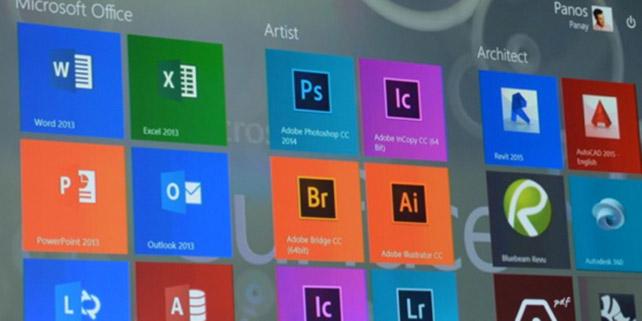
Earlier this year Adobe committed to updating its Creative Cloud suite of programs to take full advantage of the touch screen used in Microsoft's Surface Pro 3. At the recent Adobe MAX conference Adobe CEO Shantanu Narayen unveiled the changes to Adobe CC that create a unique and powerful experience for Surface Pro 3 users.
 
Adobe created a brand-new UX for the Adobe CC users by separating the applications user interface from the underlying programming code. Buttons are now large enough to be accurately touched by a finger, and the side docking station is removed when working on the Surface Pro 3. This gives users more room to work and a better perspective on their design, allowing them at-a-swipe access to panels.
 
Adobe Photoshop and Illustrator are taking a grab, drag, and drop approach allowing users to click an element, drag it into place with their finger, and manipulate it without the need for a mouse or keyboard. By adapting the layers panel for touch screen, users can more easily inspect and edit designs. Adobe is taking a similar approach with a new animations tool, tentatively called Animal. This allows designers to adopt a more native touch when designing with the Surface tablet, while still accommodating the powerful and familiar elements of Adobe Creative Cloud.
 
Surface Pro users will appreciate having creative apps from Adobe that take full advantage of the touchscreen interface in the design process. Many designers from the touch devices to be more intuitive and expressive, and having the Adobe Creative Cloud applications optimized for these devices may cause more designers to consider the Surface Pro 3. Microsoft also provide all participants of the Adobe Max conference with their own Surface Pro 3, so you may be able to hear first-hand from many designers about their personal experience with Creative Cloud tools such as Photoshop, Illustrator, and InDesign on the Surface Pro 3.
 
The training programs at American Graphics Institute may eventually integrate touch-screens in its Adobe training classes, especially Photoshop and Illustrator. and are already seeing some users with Microsoft Surface devices in the private courses delivered for individuals and corporations. These new generation of touch screen devices offer a high level of creativity and productivity to creative professionals.
About the author

Christopher Smith is president of American Graphics Institute. He is the co-author of Adobe Creative Cloud for Dummies and more than 10 other books on design and digital publishing. He served as publisher and editor of the Digital Classroom book series, which has sold more than one million books on topics relating to InDesign, Photoshop, Illustrator, After Effects, Premiere Pro and other Creative Cloud apps. At American Graphics Institute, he provides strategic technology consulting to marketing professionals, publishers designers, and large technology companies including Google, Apple, Microsoft, and HP. An expert on web analytics and digital marketing, he also delivers Google Analytics classes along with workshops on digital marketing topics. Christopher did his undergraduate studies the at the University of Minnesota, and then worked for Quark, Inc. prior to joining American Graphics Institute where he has worked for more than 20 years.

Footer
  • 781-376-6044
  • CONTACT US
  • SEE ALL AGI TRAINING LOCATIONS

© Copyright 2002 - 2026 American Graphics Institute