

Adobe training, UX Courses, and Photoshop Classes at AGI
American Graphics Institute
Secondary
  • Why AGI
  • About
  • Contact
  • Locations
  • All classes
  • Cart
  • Log in
Search
Search
Main menu
  • Classes & Workshops
    • Classes & Workshops
    • Column 1
      • Adobe Courses
      • Photoshop
      • InDesign
      • Illustrator
      • Premiere Pro
      • After Effects
      • Animate
      • Acrobat
      • Captivate
      • Creative Cloud
      • AI Classes
      • Chat GPT
      • Copilot
      • Claude AI
      • Gemini
      • Animation
      • Motion Graphics
      • After Effects
      • Animate
      • Blender
      • Cinema 4D
      • Maya
      • Digital Marketing
      • Google Analytics
      • Google Tag Manager
      • HTML Email
      • Digital Marketing Certificate
      • Elearning
      • Captivate
      • Camtasia
    • Column 2
      • Figma
      • Figma Introduction
      • Advanced Figma
      • Figma Design Systems
      • Figma Bootcamp
      • Graphic Design Courses
      • Graphic Design Course
      • AI Graphic Design Course
      • Graphic Design Certificate
      • Graphic Design for High School Students
      • Canva
      • Data Visualization
      • Office Skills
      • Excel
      • Power BI
      • PowerPoint
      • Keynote
      • Access
      • Teams
      • Google Docs
      • Presentation Design
      • PowerPoint Design
      • Keynote Presentation Design
    • Column 3
      • UX Courses
      • UX Design
      • UX Research
      • Information Architecture
      • Rapid Prototyping
      • UX for Mobile & Touch
      • Figma
      • UX Certification
      • UX Design Certificate
      • Design Thinking
      • Video Editing Courses
      • Video Production
      • Premiere Pro
      • After Effects
      • DaVinci Resolve
      • Final Cut
      • Video Editing for High School Students
      • Web Accessibility
      • Web Accessibility
      • Section 508
      • Accessibility for Designers
      • InDesign Accessibility
      • MS Office Accessibility
    • Column 4
      • Web Design
      • WordPress Classes
      • HTML
      • CSS
      • Responsive Web Design
      • Web Design Certificate
      • Web Graphics
      • Web Design for High School Students
      • Web Development
      • Agile
      • CSS
      • HTML
      • JavaScript
      • Python
      • WordPress
      • 3D Design
      • 3DS Max
      • After Effects
      • Blender
      • Cinema 4D
      • Maya
      • Motion Graphics
      • Sketchup
      • See All Classes
  • Online Training
    • Online Training
    • Column 1
      • Adobe Classes
      • Photoshop
      • InDesign
      • Illustrator
      • Premiere Pro
      • After Effects
      • Animate
      • Acrobat
      • Captivate
      • XD
      • Creative Cloud
      • All Adobe
      • Digital Marketing
      • HTML Email
      • Google Analytics
      • Google Tag Manager
      • Digital Marketing Certificate
    • Column 2
      • Elearning
      • Captivate
      • Camtasia
      • Graphic Design
      • Graphic Design Course
      • Graphic Design Certificate
      • Design Thinking
      • Office Skills
      • PowerPoint
      • Keynote
      • Excel
      • Access
      • Google Docs
      • Presentation Design
      • PowerPoint Design
      • Keynote Presentation Design
    • Column 3
      • UX Courses
      • UX Design
      • Information Architecture
      • Rapid Prototyping
      • UX for Phone & Touch
      • Figma
      • UX Certification
      • UX Design Certificate
      • Video Editing
      • Premiere Pro
      • After Effects
      • DaVinci Resolve
      • Final Cut
      • Web Accessibility
      • Web Accessibility
      • Section 508
    • Column 4
      • Web Design
      • Web Design Certificate
      • WordPress
      • HTML
      • CSS
      • Responsive Web Design
      • Web Graphics
      • Web Development
      • JavaScript
      • HTML
      • CSS
      • Drupal
      • WordPress
      • CAD & 3D Design
      • Sketchup
      • 3DS
      • Maya
      • See All Classes
  • Certificate Programs
    • Certificate Programs
    • Column 1
      • Graphic Design Certificate
      • Video Editing Certificate
      • Digital Marketing Certificate
    • Column 2
      • UX Design Certificate
      • Web Design Certificate
      • Web Development Certificate
    • Column 3
      • Photoshop Certificate
      • All Certificate Programs
  • Adobe Training
    • Adobe Training
    • Column 1
      • Photoshop
      • InDesign
      • Illustrator
      • Animate
      • Acrobat
    • Column 2
      • Premiere Pro
      • After Effects
      • XD
      • Captivate
      • Connect
    • Column 3
      • Creative Cloud
      • Adobe Express
      • Dreamweaver
      • AEM Forms
      • InCopy
      • All Adobe Classes
      • See All Classes
  • Corporate Training

  • Why AGI
  • About
  • Contact
  • Locations
  • All classes
  • Cart
  • Log in
Breadcrumb
  1. Home
  2. Adobe Courses & Adobe Training
  3. Adobe Premiere Pro Courses and Classes
  4. Premiere Pro CC Review and New Features
Premiere Pro CC Review and New Features
Related Class
Premiere Pro CC Review and New Features
Adobe Premiere Pro courses and classes
Related Articles
Image
Home

10 Best Premiere Pro Courses to take in 2025

Image
Premiere Pro CC Review and New Features

What is Premiere Pro

Image
Video Editing Courses in Chicago, IL

Best Computer for Premiere Pro 2024

Premiere Pro CC Review and New Features

  • Published on August 1, 2021
by Chris Smith
Image
Premiere Pro CC Review and New Features

This Premiere Pro CC review and new features overview describes details of Adobe's professional video-editing app, how they function, and who they benefit. Many of the functions added in Premiere Pro CC 2017 were announced previously by Adobe, and are now becoming available. The Premiere Pro CC 2017 new features are targeted at more experienced users and those working in groups, especially the new Team Projects functionality, and will have minimal impact on those just starting to use or learn Premiere Pro. The new functionality will be added into advanced Premiere Pro training and have little impact on the curriculum in introductory courses. A Premiere pro CC bug-fix was made available weeks after the initial release, once again showing why many professionals prefer to wait before updating their Adobe CC apps. 

Premiere Pro Closed Captioning and Subtitles

While Closed Captioning in Premiere Pro has been available for some time, the latest version of Premiere Pro CC improves the ability to create accessible video. Premiere Pro’s closed captioning functionality can be used to comply with regulations for broadcast and can also be used for subtitles. This can be useful on foreign-language content and web-based video that may be silent during a video preview. New functionality enables the both creating and opening of captions, with the ability to customize the location and background for captions and subtitles. Text controls for closed captions and subtitles also makes it easier to adjust font, size, and color. A function to make subtitled text easier to view now exists within the Edge Color option, and controls for modifying the location and duration for subtitles and captions is available directly from within the Premiere Pro timeline.

Premiere Pro for Groups

If you collaborate on your video editing with a team or group, Premiere Pro’s Team Projects capability makes it possible for video editors to collaborate with others working on the same project. This includes working with others in Premiere Pro CC as well as After Effects through an online, hosted service, similar to a web-meeting or a Google Doc, but directly within Premiere Pro. This makes it possible for multiple users to work on the same project at the same time. Special effects can also be added to a project using After Effects at the same time it is being edited using Premiere Pro.

Premiere Pro color correction and color enhancements

Premiere Pro uses the Lumetri Color tool for color correction and modifications. The Premiere Pro color tools have been updated to make it easier to select colors from within videos, including Hugh Saturation Lightness (HSL) secondaries as well as adjusting white balance. For advanced video that uses High Dynamic Range (HDR), the latest version adds HDR10 editing and output. Most TVs do not support HDR yet, but for those that are looking to work with this new option, Premiere Pro HDR support is now an option.

Premiere Pro VR Support

Over the past year Premiere Pro VR support has grown from non-existent to extensive. The latest version of Premiere Pro automatically determines if VR content is mono or stereoscopic. If stereo, it then determines if it is over/under or left/right. This enables Premiere Pro to control settings. To enable a greater focus on editing, the VR controls can be hidden during both editing and playback. Video that contains VR can be tagged with metadata which enables VR capable players to recognize that it contains virtual reality. Players within Facebook and YouTube then allow for a user to move and position the video using VR controllers.

Templates for Live Text in Premiere Pro

Users of the Adobe Creative Cloud app InDesign may be familiar with Master Pages for creating consistent styling and formatting. With Premiere Pro templates for live text, a similar functionality has been added. The Premiere Pro templates for live text makes it easier for repeated video clips to maintain a consistent appearance across a series of videos or clips. With a text template that is shared between Premiere Pro and the companion effects app After Effects, animations and text can be created for bumpers (intro or outro) or lower-third text, and specific items and attributes can be designated as editable using Premiere Pro. Using Premiere Pro, video editors can use After Effects capabilities directly within Premiere pro with the Live Text Templates files.

Additional Premiere Pro CC new features

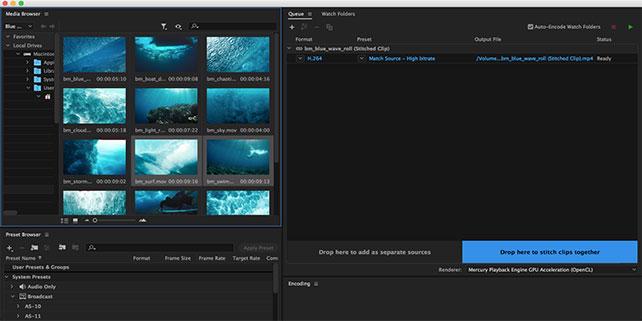
A number of smaller Premiere Pro CC new features were also added or modified from the earlier versions of the app. This includes the addition of a visual keyboard shortcut map for commonly used shortcuts and customized keyboard shortcuts for using the keyboard instead of the mouse. The Adobe Media Encoder now makes it possible for editors to stitch together multiple clips from a camera into one file for easier file-management.

Premiere Pro users who work on computers with a dedicated GPU will find effects are applied more quickly as more effects now take advantage of the GPU. The connection between Premiere Pro and After Effects is also more efficient. A new Social Publishing panel is in pre-release (Beta) for Premiere Pro CC 2017. American Graphics Institute will provide a separate review of this capability. Overall Premiere Pro CC provides enhancements that primarily help experienced video editors to work more efficiently, and those taking introductory Creative Cloud training classes will find minimal use for the new functions until they get to a more advanced level.

About the author

Christopher Smith is president of American Graphics Institute. He is the co-author of Adobe Creative Cloud for Dummies and more than 10 other books on design and digital publishing. He served as publisher and editor of the Digital Classroom book series, which has sold more than one million books on topics relating to InDesign, Photoshop, Illustrator, After Effects, Premiere Pro and other Creative Cloud apps. At American Graphics Institute, he provides strategic technology consulting to marketing professionals, publishers designers, and large technology companies including Google, Apple, Microsoft, and HP. An expert on web analytics and digital marketing, he also delivers Google Analytics classes along with workshops on digital marketing topics. Christopher did his undergraduate studies the at the University of Minnesota, and then worked for Quark, Inc. prior to joining American Graphics Institute where he has worked for more than 20 years.

Footer
  • 781-376-6044
  • CONTACT US
  • SEE ALL AGI TRAINING LOCATIONS

© Copyright 2002 - 2026 American Graphics Institute