Adobe training, UX Courses, and Photoshop Classes at AGI
American Graphics Institute
Secondary
  • Why AGI
  • About
  • Contact
  • Locations
  • All classes
  • Cart
  • Log in
Search
Search
Main menu
  • Classes & Workshops
    • Classes & Workshops
    • Column 1
      • Adobe Courses
      • Photoshop
      • InDesign
      • Illustrator
      • Premiere Pro
      • After Effects
      • Animate
      • Acrobat
      • Captivate
      • Creative Cloud
      • AI Classes
      • Chat GPT
      • Copilot
      • Claude AI
      • Gemini
      • Animation
      • Motion Graphics
      • After Effects
      • Animate
      • Blender
      • Cinema 4D
      • Maya
      • Digital Marketing
      • Google Analytics
      • Google Tag Manager
      • HTML Email
      • Digital Marketing Certificate
      • Elearning
      • Captivate
      • Camtasia
    • Column 2
      • Figma
      • Figma Introduction
      • Advanced Figma
      • Figma Design Systems
      • Figma Bootcamp
      • Graphic Design Courses
      • Graphic Design Course
      • AI Graphic Design Course
      • Graphic Design Certificate
      • Graphic Design for High School Students
      • Canva
      • Data Visualization
      • Office Skills
      • Excel
      • Power BI
      • PowerPoint
      • Keynote
      • Access
      • Teams
      • Google Docs
      • Presentation Design
      • PowerPoint Design
      • Keynote Presentation Design
    • Column 3
      • UX Courses
      • UX Design
      • UX Research
      • Information Architecture
      • Rapid Prototyping
      • UX for Mobile & Touch
      • Figma
      • UX Certification
      • UX Design Certificate
      • Design Thinking
      • Video Editing Courses
      • Video Production
      • Premiere Pro
      • After Effects
      • DaVinci Resolve
      • Final Cut
      • Video Editing for High School Students
      • Web Accessibility
      • Web Accessibility
      • Section 508
      • Accessibility for Designers
      • InDesign Accessibility
      • MS Office Accessibility
    • Column 4
      • Web Design
      • WordPress Classes
      • HTML
      • CSS
      • Responsive Web Design
      • Web Design Certificate
      • Web Graphics
      • Web Design for High School Students
      • Web Development
      • Agile
      • CSS
      • HTML
      • JavaScript
      • Python
      • WordPress
      • 3D Design
      • 3DS Max
      • After Effects
      • Blender
      • Cinema 4D
      • Maya
      • Motion Graphics
      • Sketchup
      • See All Classes
  • Online Training
    • Online Training
    • Column 1
      • Adobe Classes
      • Photoshop
      • InDesign
      • Illustrator
      • Premiere Pro
      • After Effects
      • Animate
      • Acrobat
      • Captivate
      • XD
      • Creative Cloud
      • All Adobe
      • Digital Marketing
      • HTML Email
      • Google Analytics
      • Google Tag Manager
      • Digital Marketing Certificate
    • Column 2
      • Elearning
      • Captivate
      • Camtasia
      • Graphic Design
      • Graphic Design Course
      • Graphic Design Certificate
      • Design Thinking
      • Office Skills
      • PowerPoint
      • Keynote
      • Excel
      • Access
      • Google Docs
      • Presentation Design
      • PowerPoint Design
      • Keynote Presentation Design
    • Column 3
      • UX Courses
      • UX Design
      • Information Architecture
      • Rapid Prototyping
      • UX for Phone & Touch
      • Figma
      • UX Certification
      • UX Design Certificate
      • Video Editing
      • Premiere Pro
      • After Effects
      • DaVinci Resolve
      • Final Cut
      • Web Accessibility
      • Web Accessibility
      • Section 508
    • Column 4
      • Web Design
      • Web Design Certificate
      • WordPress
      • HTML
      • CSS
      • Responsive Web Design
      • Web Graphics
      • Web Development
      • JavaScript
      • HTML
      • CSS
      • Drupal
      • WordPress
      • CAD & 3D Design
      • Sketchup
      • 3DS
      • Maya
      • See All Classes
  • Certificate Programs
    • Certificate Programs
    • Column 1
      • AI Certificate
      • Graphic Design Certificate
      • Video Editing Certificate
      • Digital Marketing Certificate
    • Column 2
      • UX Design Certificate
      • Web Design Certificate
      • Web Development Certificate
    • Column 3
      • Photoshop Certificate
      • All Certificate Programs
  • Adobe Training
    • Adobe Training
    • Column 1
      • Photoshop
      • InDesign
      • Illustrator
      • Animate
      • Acrobat
    • Column 2
      • Premiere Pro
      • After Effects
      • XD
      • Captivate
      • Connect
    • Column 3
      • Creative Cloud
      • Adobe Express
      • Dreamweaver
      • AEM Forms
      • InCopy
      • All Adobe Classes
      • See All Classes
  • Corporate Training

  • Why AGI
  • About
  • Contact
  • Locations
  • All classes
  • Cart
  • Log in
Breadcrumb
  1. Home
  2. Design News
  3. Lego Leah Leaves a Legacy
Lego Leah leaves a legacy
Related Class
Adobe courses & Adobe training
Related Articles
Image
Figma course students working at a computer using Figma for a project.

Adobe - Figma merger canceled

Image
Adobe courses & Adobe training

Training Grant: free training for Massachusetts employees & employers

Image
Adobe courses & Adobe training

Using Bootcamp for Creative Cloud

Lego Leah leaves a legacy

  • Published on April 3, 2014
by Jennifer Smith
Image
Lego Leah leaves a legacy

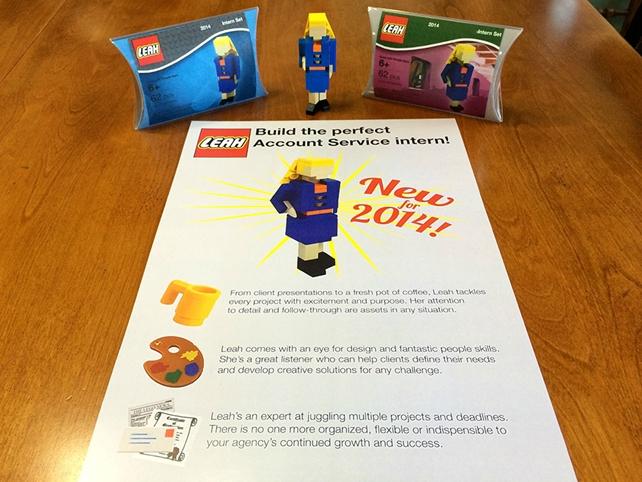
Creative resumes frequently gain an impressive amount of attention on social media sharing sites like Buzzfeed and Reddit. One job application that recently piqued the interest of national news agencies comes from 20-year-old Leah Bowman, who created a resume that had to be physically assembled by the people who read it.

According to ABC News, Bowman's resume kit comes with a set of Legos and instruction sheet for assemblers to follow. The packaging perfectly resembles the traditional packaging in which Lego sells its products. In the top left corner, a red block reads "LEAH" instead of "LEGO." Underneath, she mocks the age requirement frequently posted on Lego sets by writing, "Great with People Ages 6+." Additionally, she included a visual resume that features the same "LEAH" block, along with an image of the figure and several of her skills listed beneath.

After posting her creation to Reddit, the young woman received a wave of attention. It was quickly picked up by Good Morning America, where she explained that the project has given her quite a bit of unexpected press so far.

"The attention has been overwhelming in the best way," Bowman said. "A lot of people have expressed how creative or unique my project was."

While her resume has been crafted using design software and she indicates that she has design skills, she does not wish to pursue a career in the digital design field.

Building a creative package such as the ones used by Leah Bowman uses skills with tools such as Photoshop, Illustrator, and InDesign. A good starting point for learning how to create attention-worthy graphics is to build your page-layout skills with InDesign classes and image editing skills with Photoshop classes. 

About the author

Christopher Smith is president of American Graphics Institute. He is the co-author of Adobe Creative Cloud for Dummies and more than 10 other books on design and digital publishing. He served as publisher and editor of the Digital Classroom book series, which has sold more than one million books on topics relating to InDesign, Photoshop, Illustrator, After Effects, Premiere Pro and other Creative Cloud apps. At American Graphics Institute, he provides strategic technology consulting to marketing professionals, publishers designers, and large technology companies including Google, Apple, Microsoft, and HP. An expert on web analytics and digital marketing, he also delivers Google Analytics classes along with workshops on digital marketing topics. Christopher did his undergraduate studies the at the University of Minnesota, and then worked for Quark, Inc. prior to joining American Graphics Institute where he has worked for more than 20 years.

Footer
  • 781-376-6044
  • CONTACT US
  • SEE ALL AGI TRAINING LOCATIONS

© Copyright 2002 - 2026 American Graphics Institute