

Adobe training, UX Courses, and Photoshop Classes at AGI
American Graphics Institute
Secondary
  • Why AGI
  • About
  • Contact
  • Locations
  • All classes
  • Cart
  • Log in
Search
Search
Main menu
  • Classes & Workshops
    • Classes & Workshops
    • Column 1
      • Adobe Courses
      • Photoshop
      • InDesign
      • Illustrator
      • Premiere Pro
      • After Effects
      • Animate
      • Acrobat
      • Captivate
      • Creative Cloud
      • AI Classes
      • Copilot
      • Claude AI
      • Gemini
      • Animation
      • Motion Graphics
      • After Effects
      • Animate
      • Blender
      • Cinema 4D
      • Maya
      • Digital Marketing
      • Google Analytics
      • Google Tag Manager
      • HTML Email
      • Digital Marketing Certificate
      • Elearning
      • Captivate
      • Camtasia
    • Column 2
      • Figma
      • Figma Introduction
      • Advanced Figma
      • Figma Design Systems
      • Figma Bootcamp
      • Graphic Design Courses
      • Graphic Design Course
      • AI Graphic Design Course
      • Graphic Design Certificate
      • Graphic Design for High School Students
      • Canva
      • Data Visualization
      • Office Skills
      • Excel
      • Power BI
      • PowerPoint
      • Keynote
      • Access
      • Teams
      • Google Docs
      • Presentation Design
      • PowerPoint Design
      • Keynote Presentation Design
    • Column 3
      • UX Courses
      • UX Design
      • UX Research
      • Information Architecture
      • Rapid Prototyping
      • UX for Mobile & Touch
      • Figma
      • UX Certification
      • UX Design Certificate
      • Design Thinking
      • Video Editing Courses
      • Video Production
      • Premiere Pro
      • After Effects
      • DaVinci Resolve
      • Final Cut
      • Video Editing for High School Students
      • Web Accessibility
      • Web Accessibility
      • Section 508
      • Accessibility for Designers
      • InDesign Accessibility
      • MS Office Accessibility
    • Column 4
      • Web Design
      • WordPress Classes
      • HTML
      • CSS
      • Responsive Web Design
      • Web Design Certificate
      • Web Graphics
      • Web Design for High School Students
      • Web Development
      • Agile
      • CSS
      • HTML
      • JavaScript
      • Python
      • WordPress
      • 3D Design
      • 3DS Max
      • After Effects
      • Blender
      • Cinema 4D
      • Maya
      • Motion Graphics
      • Sketchup
      • See All Classes
  • Online Training
    • Online Training
    • Column 1
      • Adobe Classes
      • Photoshop
      • InDesign
      • Illustrator
      • Premiere Pro
      • After Effects
      • Animate
      • Acrobat
      • Captivate
      • XD
      • Creative Cloud
      • All Adobe
      • Digital Marketing
      • HTML Email
      • Google Analytics
      • Google Tag Manager
      • Digital Marketing Certificate
    • Column 2
      • Elearning
      • Captivate
      • Camtasia
      • Graphic Design
      • Graphic Design Course
      • Graphic Design Certificate
      • Design Thinking
      • Office Skills
      • PowerPoint
      • Keynote
      • Excel
      • Access
      • Google Docs
      • Presentation Design
      • PowerPoint Design
      • Keynote Presentation Design
    • Column 3
      • UX Courses
      • UX Design
      • Information Architecture
      • Rapid Prototyping
      • UX for Phone & Touch
      • Figma
      • UX Certification
      • UX Design Certificate
      • Video Editing
      • Premiere Pro
      • After Effects
      • DaVinci Resolve
      • Final Cut
      • Web Accessibility
      • Web Accessibility
      • Section 508
    • Column 4
      • Web Design
      • Web Design Certificate
      • WordPress
      • HTML
      • CSS
      • Responsive Web Design
      • Web Graphics
      • Web Development
      • JavaScript
      • HTML
      • CSS
      • Drupal
      • WordPress
      • CAD & 3D Design
      • Sketchup
      • 3DS
      • Maya
      • See All Classes
  • Certificate Programs
    • Certificate Programs
    • Column 1
      • Graphic Design Certificate
      • Video Editing Certificate
      • Digital Marketing Certificate
    • Column 2
      • UX Design Certificate
      • Web Design Certificate
      • Web Development Certificate
    • Column 3
      • Photoshop Certificate
      • All Certificate Programs
  • Adobe Training
    • Adobe Training
    • Column 1
      • Photoshop
      • InDesign
      • Illustrator
      • Animate
      • Acrobat
    • Column 2
      • Premiere Pro
      • After Effects
      • XD
      • Captivate
      • Connect
    • Column 3
      • Creative Cloud
      • Adobe Express
      • Dreamweaver
      • AEM Forms
      • InCopy
      • All Adobe Classes
      • See All Classes
  • Corporate Training

  • Why AGI
  • About
  • Contact
  • Locations
  • All classes
  • Cart
  • Log in
Breadcrumb
  1. Home
  2. Adobe Courses & Adobe Training
  3. Photoshop Classes
  4. Why Photoshop Is a Good Skill
Why Photoshop is a Good Skill
We'll provide you personalized training options right away.

We never sell or share your information

Related Class
Why Photoshop is a Good Skill
Photoshop classes
Related Articles
Image
Why Photoshop is a Good Skill

8 Best Photoshop Classes from Schools, Universities and Colleges

Image
Why Photoshop is a Good Skill

What is Photoshop

Image
Photoshop Expert Jennifer Smith from American Graphics Institute interviewed by NBC News.

Image Editing and Photoshop Expert Jennifer Smith interviewed

Why Photoshop is a Good Skill

  • Published on March 17, 2022
by Jennifer Smith
Image
Why Photoshop is a Good Skill

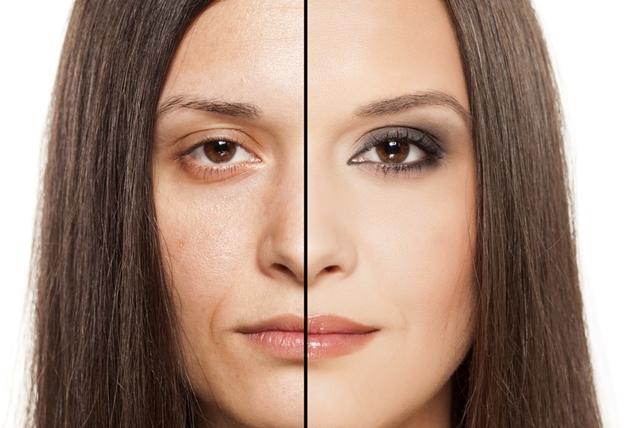
Because Photoshop is so widely used in design, marketing, creative and engineering roles, Photoshop skills are useful for professionals and students. Since it launched more than 25 years ago, Adobe Photoshop has become the undisputed king of image manipulation software. Photoshop has become one of the most widely used programs across a variety of industries, and having Photoshop skills helps whether you are a working professional, a student, or an enthusiast. Because learning Photoshop can take some time, you may want to consider Photoshop classes as a way to improve your Photoshop skills. Here are a few reasons Photoshop skills are good to have:

1. Photoshop skills improve your résumé
Photoshop's influence can be seen almost everywhere. From the glossy advertisements in the nation's leading magazines to the increasingly realistic textures featured in today's most advanced video games, Photoshop is an indispensable tool to professionals in the creative industries. However, the need for image manipulation skills has become an everyday reality in many sectors, including marketing, publishing and, of course, design. Take a look at many job ads, and more often that not, familiarity with the Adobe Creative Cloud is listed as "advantageous" or "highly desirable," if not essential. Having Photoshop skills is an excellent first step in setting yourself apart from the competition and making you a more attractive candidate for that job you've always wanted.

2. Make a career switch with Photoshop skills
Ever wanted to create the stunning visuals you see every day on TV, in the movies, or in magazines? Tired of the grind of your current job and want to try something a little more creatively fulfilling? Then embarking on a Photoshop training course is the first step toward a more satisfying career. Once you've mastered your Photoshop skills, you'll be ready to learn complementary software packages through Adobe Illustrator classes to bolster your skill set and create stunning vector graphics that you can manipulate further inside Photoshop. Who knows? You could even start your own freelance design business on the side while you prepare to make the switch.

3. Photoshop skills improve your marketing materials
If you work in marketing, you already know how important aesthetics are when it comes to delivering high-impact collateral. With Photoshop skills you can take control of the appearance of your marketing materials and create professional-quality graphics in-house. In an increasingly competitive business environment, first impressions are everything - don't leave the success of your next campaign to chance. Take Photoshop classes and make your promotional materials stand out from the rest, even if you are a beginner.

Learning Photoshop could also make your boss very happy. After all, if you can personally create stunning graphics and visuals yourself, why hire someone else to do it? Mastering Photoshop makes you an even more valuable member of the team, and in today's economy, that can be a very big deal.

4. Photoshop skills let you be more creative
With Photoshop, the possibilities are literally endless. If you want to unleash your creativity, Photoshop is the ultimate Swiss army knife of software packages. From digital painting and image manipulation to photo restoration and even 3D graphics, Photoshop allows you to bring your visions to life. Next time you've got a friend or family member's birthday coming up, or another celebration that would ordinarily require a greeting card, why not create your own bold, eye-catching design and add the kind of personal flair that generic greetings just can't match? 

5. You can make money with Photoshop
If you have the right Photoshop skills, you can make money with Photoshop. Whether working as a designer or retoucher professionally, or using your Photoshop skills as a side job, there are many options available for you to make money with Photoshop.

After taking Photoshop training through the American Graphics Institute, you'll be feathering masks and blending layer modes like a pro in no time. Not sure what these terms mean? Then why not think about taking Photoshop classes to find out?

About the author

Jennifer Smith is a user experience designer, educator and author based in Boston. She has worked in the field of user experience design for more than 15 years. She has designed websites, ecommerce sites, apps, and embedded systems. Jennifer designs solutions for mobile, desktop, and iOT devices. Jennifer holds a Master of Science (MS) degree in Human Factors in Information Design, a Bachelors degree with a concentration in Commercial Art. When not teaching at American Graphics Institute, Jennifer Smith is an adjunct professor at Boston University.

Jennifer delivers UX training and UX consulting for large Fortune 100 companies, small start-ups, and independent software vendors.She has served as a Designer in Residence at Microsoft, assisting third-party app developers to improve their design solutions and create successful user experiences. She has been hired by Adobe and Microsoft to deliver training workshops to their staff, and has traveled to Asia, Europe, India, the Middle East, and across the U.S. to deliver courses and assist on UX design projects. She has extensive knowledge of modern UX Design, and worked closely with major tech companies to create educational material and deliver UX workshops to key partners globally. Jennifer works with a wide range of prototyping tools including XD, Sketch, Balsamiq, Fireworks, Photoshop, Illustrator, and Blend for Visual Studio. She also works extensively in the fields of presentation design and visual design.

Jennifer is also an expert on Photoshop, digital image editing, and photo manipulation. Having written 10 books on Photoshop, and having consulted and provided training to major media companies and businesses around the globe.

Jennifer is the author of more than 20 books on design tools and processes, including Adobe Creative Cloud for Dummies, Adobe Creative Cloud Digital Classroom, and Photoshop Digital Classroom. She has been awarded a Microsoft MVP three times for her work with user experience design in creating apps for touch, desktop, and mobile devices. Jennifer holds the CPUX-F certification from the User Experience Qualification Board and assists others in attaining this designation in leading a UX certification course at American Graphics Institute.

Footer
  • 781-376-6044
  • CONTACT US
  • SEE ALL AGI TRAINING LOCATIONS

© Copyright 2002 - 2026 American Graphics Institute