Adobe training, UX Courses, and Photoshop Classes at AGI
American Graphics Institute
Secondary
  • Why AGI
  • About
  • Contact
  • Locations
  • All classes
  • Cart
  • Log in
Search
Search
Main menu
  • Classes & Workshops
    • Classes & Workshops
    • Column 1
      • Adobe Courses
      • Photoshop
      • InDesign
      • Illustrator
      • Premiere Pro
      • After Effects
      • Animate
      • Acrobat
      • Captivate
      • Creative Cloud
      • AI Classes
      • Copilot
      • Claude AI
      • Gemini
      • Animation
      • Motion Graphics
      • After Effects
      • Animate
      • Blender
      • Cinema 4D
      • Maya
      • Digital Marketing
      • Google Analytics
      • Google Tag Manager
      • HTML Email
      • Digital Marketing Certificate
      • Elearning
      • Captivate
      • Camtasia
    • Column 2
      • Figma
      • Figma Introduction
      • Advanced Figma
      • Figma Design Systems
      • Figma Bootcamp
      • Graphic Design Courses
      • Graphic Design Course
      • AI Graphic Design Course
      • Graphic Design Certificate
      • Graphic Design for High School Students
      • Canva
      • Data Visualization
      • Office Skills
      • Excel
      • Power BI
      • PowerPoint
      • Keynote
      • Access
      • Teams
      • Google Docs
      • Presentation Design
      • PowerPoint Design
      • Keynote Presentation Design
    • Column 3
      • UX Courses
      • UX Design
      • UX Research
      • Information Architecture
      • Rapid Prototyping
      • UX for Mobile & Touch
      • Figma
      • UX Certification
      • UX Design Certificate
      • Design Thinking
      • Video Editing Courses
      • Video Production
      • Premiere Pro
      • After Effects
      • DaVinci Resolve
      • Final Cut
      • Video Editing for High School Students
      • Web Accessibility
      • Web Accessibility
      • Section 508
      • Accessibility for Designers
      • InDesign Accessibility
      • MS Office Accessibility
    • Column 4
      • Web Design
      • WordPress Classes
      • HTML
      • CSS
      • Responsive Web Design
      • Web Design Certificate
      • Web Graphics
      • Web Design for High School Students
      • Web Development
      • Agile
      • CSS
      • HTML
      • JavaScript
      • Python
      • WordPress
      • 3D Design
      • 3DS Max
      • After Effects
      • Blender
      • Cinema 4D
      • Maya
      • Motion Graphics
      • Sketchup
      • See All Classes
  • Online Training
    • Online Training
    • Column 1
      • Adobe Classes
      • Photoshop
      • InDesign
      • Illustrator
      • Premiere Pro
      • After Effects
      • Animate
      • Acrobat
      • Captivate
      • XD
      • Creative Cloud
      • All Adobe
      • Digital Marketing
      • HTML Email
      • Google Analytics
      • Google Tag Manager
      • Digital Marketing Certificate
    • Column 2
      • Elearning
      • Captivate
      • Camtasia
      • Graphic Design
      • Graphic Design Course
      • Graphic Design Certificate
      • Design Thinking
      • Office Skills
      • PowerPoint
      • Keynote
      • Excel
      • Access
      • Google Docs
      • Presentation Design
      • PowerPoint Design
      • Keynote Presentation Design
    • Column 3
      • UX Courses
      • UX Design
      • Information Architecture
      • Rapid Prototyping
      • UX for Phone & Touch
      • Figma
      • UX Certification
      • UX Design Certificate
      • Video Editing
      • Premiere Pro
      • After Effects
      • DaVinci Resolve
      • Final Cut
      • Web Accessibility
      • Web Accessibility
      • Section 508
    • Column 4
      • Web Design
      • Web Design Certificate
      • WordPress
      • HTML
      • CSS
      • Responsive Web Design
      • Web Graphics
      • Web Development
      • JavaScript
      • HTML
      • CSS
      • Drupal
      • WordPress
      • CAD & 3D Design
      • Sketchup
      • 3DS
      • Maya
      • See All Classes
  • Certificate Programs
    • Certificate Programs
    • Column 1
      • Graphic Design Certificate
      • Video Editing Certificate
      • Digital Marketing Certificate
    • Column 2
      • UX Design Certificate
      • Web Design Certificate
      • Web Development Certificate
    • Column 3
      • Photoshop Certificate
      • All Certificate Programs
  • Adobe Training
    • Adobe Training
    • Column 1
      • Photoshop
      • InDesign
      • Illustrator
      • Animate
      • Acrobat
    • Column 2
      • Premiere Pro
      • After Effects
      • XD
      • Captivate
      • Connect
    • Column 3
      • Creative Cloud
      • Adobe Express
      • Dreamweaver
      • AEM Forms
      • InCopy
      • All Adobe Classes
      • See All Classes
  • Corporate Training

  • Why AGI
  • About
  • Contact
  • Locations
  • All classes
  • Cart
  • Log in
Breadcrumb
  1. Home
  2. UX Design Courses
  3. Adobe UX App Improved: Adobe XD Review
Adobe UX app improved: Adobe XD Review
We'll provide you personalized training options right away.

We never sell or share your information

Related Class
Adobe UX app improved: Adobe XD Review
UX Design courses
Related Articles
Image
Figma course students working at a computer using Figma for a project.

Adobe - Figma merger canceled

Image
UX courses in Nebraska

Best UX Design Courses and Certificates

Image
UX Prototyping Software App displayed

Comparing Figma vs. Sketch for Prototyping apps

Adobe UX app improved: Adobe XD Review

  • Published on April 28, 2016
by Jennifer Smith
Image
Adobe UX app improved: Adobe XD Review

The Adobe UX design app released earlier this year in a beta (pre-release) form has received a number of new capabilities in an update rolled-out this week. The UX app is called Adobe Experience Design, or Adobe XD, and this user experience app is available as part of the Adobe Creative Cloud subscription. The updates to this UX app are considerable, making it nearly ready as it evolves into a robust UX prototyping app that may evenutally find itself part of the curriculum in UX classes and the UX Certificate program.

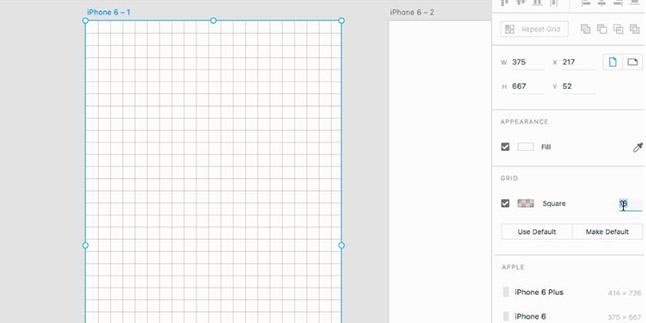
Refined UX control with Custom Grids

Anyone that has worked with other Adobe applications is familiar with the precise grids available for defining a layout. Adobe XD has picked up the grid functionality from its big-brother tools such as Photoshop, Illustrator, and InDesign. As with these other apps, when items are placed into a grid, they snap to grid locations. Additionally, the grid itself can be customized, just as it can in other Adobe CC apps.

Improved Text Controls come to Adobe’s UX Design Tool

The space between lines of type has been precisely controlled by designers and publishers long before there were UX and UI designers concerned about app and web interfaces. The name for this control, leading, is derived from the pieces of the metal lead which were placed between lines of text when each line was set manually on early printing presses. The latest release of Adobe XD provides UX designers with these vertical spacing controls when designing prototypes, giving similar controls to tools such as InDesign and Illustrator.

Drag Images and Text into UX Mockups

Importing items into layouts of Adobe XD is much faster, and is also similar to InDesign, Photoshop, and Illustrator. Just as longstanding Adobe tools make it easy to import items from an operating system’s folder or from another app window, and Adobe XD now makes it possible for UX Designers to quickly drag items into a layout as well.

Importing Illustrator and Photoshop artwork into UX layouts

UI designers frequently use Adobe Illustrator to create user interface elements, from logos to buttons. When Illustrator artwork also includes other embedded images, they previously did not import into an Adobe XD layout. This has changed for the better, as the UX app now displays artwork as well as images embedded within the artwork that is imported from Illustrator.

Linking UI elements imported into UX prototypes

UX layouts containing many images, icon, and logos can easily become large files that are slow to share and unnecessarily take up large amount of storage space. Additionally, if an icon or image that is part of a layout is updated, it is useful to know that the original UI artwork has changed. Adobe XD now provides an option of linking imported elements, just as can be done in Illustrator when creating mockups. This way if artwork changes, the design within the mockup or prototype can be quickly updated. Adobe XD, like Illustrator, also provides notification when artwork has changed.

Sharing UX Prototypes Online

A UX prototype can be shared online with Adobe XD with the click of a button. With this most recent update, multiple versions of a prototype can also be shared for A/B testing or to confirm changes from one version meet the expectations of a UI designer or other stakeholder.

Adobe UX App Windows Support

Adobe XD is gaining a number of key capabilities that will eventually make it a useful tool for many UX designers. Yet adobe has taken a Mac OS focused approach at the present time, and there is not yet an Adobe UX app for Windows. This alienates many UX Designers who work on Windows PC systems. Alarmingly there’s a growing list of apps that Adobe also makes only for the iOS and no other touch and tablet platforms such as Windows 10 and Android. As many enterprise app designers work within Windows environments, Adobe XD for Windows will need to become a reality before this UX app can gain more widespread use in the UX community. While Adobe previously had a strong reputation of making most of their desktop apps available for both Mac and Windows users, this parity doesn’t exist with this UX app, but hopefully it will be forthcoming.

About the author

Jennifer Smith is a user experience designer, educator and author based in Boston. She has worked in the field of user experience design for more than 15 years. She has designed websites, ecommerce sites, apps, and embedded systems. Jennifer designs solutions for mobile, desktop, and iOT devices. Jennifer holds a Master of Science (MS) degree in Human Factors in Information Design, a Bachelors degree with a concentration in Commercial Art. When not teaching at American Graphics Institute, Jennifer Smith is an adjunct professor at Boston University.

Jennifer delivers UX training and UX consulting for large Fortune 100 companies, small start-ups, and independent software vendors.She has served as a Designer in Residence at Microsoft, assisting third-party app developers to improve their design solutions and create successful user experiences. She has been hired by Adobe and Microsoft to deliver training workshops to their staff, and has traveled to Asia, Europe, India, the Middle East, and across the U.S. to deliver courses and assist on UX design projects. She has extensive knowledge of modern UX Design, and worked closely with major tech companies to create educational material and deliver UX workshops to key partners globally. Jennifer works with a wide range of prototyping tools including XD, Sketch, Balsamiq, Fireworks, Photoshop, Illustrator, and Blend for Visual Studio. She also works extensively in the fields of presentation design and visual design.

Jennifer is also an expert on Photoshop, digital image editing, and photo manipulation. Having written 10 books on Photoshop, and having consulted and provided training to major media companies and businesses around the globe.

Jennifer is the author of more than 20 books on design tools and processes, including Adobe Creative Cloud for Dummies, Adobe Creative Cloud Digital Classroom, and Photoshop Digital Classroom. She has been awarded a Microsoft MVP three times for her work with user experience design in creating apps for touch, desktop, and mobile devices. Jennifer holds the CPUX-F certification from the User Experience Qualification Board and assists others in attaining this designation in leading a UX certification course at American Graphics Institute.

Footer
  • 781-376-6044
  • CONTACT US
  • SEE ALL AGI TRAINING LOCATIONS

© Copyright 2002 - 2026 American Graphics Institute