

Adobe training, UX Courses, and Photoshop Classes at AGI
American Graphics Institute
Secondary
  • Why AGI
  • About
  • Contact
  • Locations
  • All classes
  • Cart
  • Log in
Search
Search
Main menu
  • Classes & Workshops
    • Classes & Workshops
    • Column 1
      • Adobe Courses
      • Photoshop
      • InDesign
      • Illustrator
      • Premiere Pro
      • After Effects
      • Animate
      • Acrobat
      • Captivate
      • Creative Cloud
      • AI Classes
      • Copilot
      • Claude AI
      • Gemini
      • Animation
      • Motion Graphics
      • After Effects
      • Animate
      • Blender
      • Cinema 4D
      • Maya
      • Digital Marketing
      • Google Analytics
      • Google Tag Manager
      • HTML Email
      • Digital Marketing Certificate
      • Elearning
      • Captivate
      • Camtasia
    • Column 2
      • Figma
      • Figma Introduction
      • Advanced Figma
      • Figma Design Systems
      • Figma Bootcamp
      • Graphic Design Courses
      • Graphic Design Course
      • AI Graphic Design Course
      • Graphic Design Certificate
      • Graphic Design for High School Students
      • Canva
      • Data Visualization
      • Office Skills
      • Excel
      • Power BI
      • PowerPoint
      • Keynote
      • Access
      • Teams
      • Google Docs
      • Presentation Design
      • PowerPoint Design
      • Keynote Presentation Design
    • Column 3
      • UX Courses
      • UX Design
      • UX Research
      • Information Architecture
      • Rapid Prototyping
      • UX for Mobile & Touch
      • Figma
      • UX Certification
      • UX Design Certificate
      • Design Thinking
      • Video Editing Courses
      • Video Production
      • Premiere Pro
      • After Effects
      • DaVinci Resolve
      • Final Cut
      • Video Editing for High School Students
      • Web Accessibility
      • Web Accessibility
      • Section 508
      • Accessibility for Designers
      • InDesign Accessibility
      • MS Office Accessibility
    • Column 4
      • Web Design
      • WordPress Classes
      • HTML
      • CSS
      • Responsive Web Design
      • Web Design Certificate
      • Web Graphics
      • Web Design for High School Students
      • Web Development
      • Agile
      • CSS
      • HTML
      • JavaScript
      • Python
      • WordPress
      • 3D Design
      • 3DS Max
      • After Effects
      • Blender
      • Cinema 4D
      • Maya
      • Motion Graphics
      • Sketchup
      • See All Classes
  • Online Training
    • Online Training
    • Column 1
      • Adobe Classes
      • Photoshop
      • InDesign
      • Illustrator
      • Premiere Pro
      • After Effects
      • Animate
      • Acrobat
      • Captivate
      • XD
      • Creative Cloud
      • All Adobe
      • Digital Marketing
      • HTML Email
      • Google Analytics
      • Google Tag Manager
      • Digital Marketing Certificate
    • Column 2
      • Elearning
      • Captivate
      • Camtasia
      • Graphic Design
      • Graphic Design Course
      • Graphic Design Certificate
      • Design Thinking
      • Office Skills
      • PowerPoint
      • Keynote
      • Excel
      • Access
      • Google Docs
      • Presentation Design
      • PowerPoint Design
      • Keynote Presentation Design
    • Column 3
      • UX Courses
      • UX Design
      • Information Architecture
      • Rapid Prototyping
      • UX for Phone & Touch
      • Figma
      • UX Certification
      • UX Design Certificate
      • Video Editing
      • Premiere Pro
      • After Effects
      • DaVinci Resolve
      • Final Cut
      • Web Accessibility
      • Web Accessibility
      • Section 508
    • Column 4
      • Web Design
      • Web Design Certificate
      • WordPress
      • HTML
      • CSS
      • Responsive Web Design
      • Web Graphics
      • Web Development
      • JavaScript
      • HTML
      • CSS
      • Drupal
      • WordPress
      • CAD & 3D Design
      • Sketchup
      • 3DS
      • Maya
      • See All Classes
  • Certificate Programs
    • Certificate Programs
    • Column 1
      • Graphic Design Certificate
      • Video Editing Certificate
      • Digital Marketing Certificate
    • Column 2
      • UX Design Certificate
      • Web Design Certificate
      • Web Development Certificate
    • Column 3
      • Photoshop Certificate
      • All Certificate Programs
  • Adobe Training
    • Adobe Training
    • Column 1
      • Photoshop
      • InDesign
      • Illustrator
      • Animate
      • Acrobat
    • Column 2
      • Premiere Pro
      • After Effects
      • XD
      • Captivate
      • Connect
    • Column 3
      • Creative Cloud
      • Adobe Express
      • Dreamweaver
      • AEM Forms
      • InCopy
      • All Adobe Classes
      • See All Classes
  • Corporate Training

  • Why AGI
  • About
  • Contact
  • Locations
  • All classes
  • Cart
  • Log in
Breadcrumb
  1. Home
  2. Adobe Courses & Adobe Training
  3. InDesign Courses and Classes
  4. Highlights Magazine Transitions To Digital Without Adobe InDesign
Highlights Magazine transitions to Digital without Adobe InDesign
We'll provide you personalized training options right away.

We never sell or share your information

Related Class
Highlights Magazine transitions to Digital without Adobe InDesign
InDesign courses and classes
Related Articles
Image
What is InDesign

10 Best InDesign Courses Online or In-Person

Image
What is InDesign

What is InDesign

Image
What is InDesign

Learn InDesign: Five options for learning InDesign

Highlights Magazine transitions to Digital without Adobe InDesign

  • Published on August 5, 2015
by Chris Smith
Image
Highlights Magazine transitions to Digital without Adobe InDesign

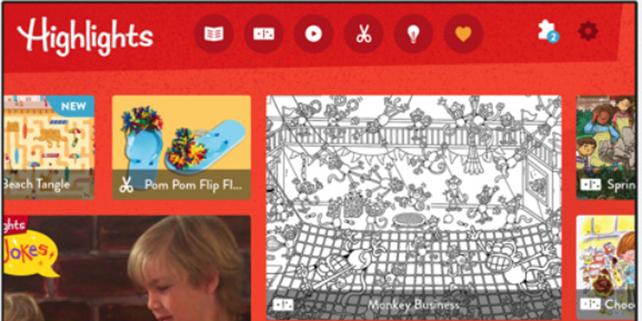
Many publishers that enroll in the InDesign classes at American Graphics Institute assume that the transition from print to digital should occur entirely within InDesign and other Adobe tools. A recent update to Adobe Digital Publishing Suite created the Digital Publishing Solution which was designed to keep publishers within the Adobe ecosystem for all types of publishing – both print and online. Yet one major magazine publisher is taking a different approach, forgoing the Adobe DPS tools and creating a digital extension of their magazine brand. Highlights magazine is combining content from their print publication along with dedicated digital content such as games and video for a mobile app that is scheduled to be available later this year.

Highlights magazine is working in partnership with Fingerprint, a startup based in San Francisco that creates apps for children that integrate a variety of educational and entertainment content. While the digital format will be using some of the hundreds of thousands of activities created for their magazines over the past 70 years, Highlights is looking to do more than simply re-use print content in a digital format.

Highlights magazine has a subscription base of more than 2 million readers. Although Illustrator, Photoshop, and InDesign can help make a great print magazine, it’s difficult to compete for the attention of today’s children. Keeping the current subscriber level or even growing it requires revising the way content is presented to children. Many children are accustomed to playing games such as Minecraft, watching videos on Netflix, or reading interactive children’s books on their iPad or Kindle Fire. Highlights magazine hopes to compete for the attention of children by reimagining their existing content as well as creating new content as well. Highlights will offer free and paid services, as well as subscription-based content.

The apps that Highlights plans to ship with the help of Fingerprint will enable children to create their own stories, and they’ll also have another that uses one of Highlights most popular features, a game with hidden pictures. Following these, a digital version of the magazine will be released and include interactive content along with video. While these interactive publications are exactly the audience that Adobe is seeking to court with InDesign and Adobe DPS, this is being done entirely on Fingerprint’s proprietary platform.

Like the new Adobe DPS, content can be hosted for the publisher, and digital rights management (DRM) can control access to content. The Fingerprint solution also adds compliance with laws and regulations that govern publishing and advertising to children online, such as COPPA, and concerns of parents, with available parental controls. For a child-focused audience, an Adobe InDesign workflow with Adobe DPS doesn’t offer the levels of controls. Additionally, Fingerprint can help to access licensed content from other providers should Highlights wish to use it within their upcoming apps. If this partnership is successful, Fingerprint may provide an alternative to DPS for publishers seeking to create a stronger digital presence that goes beyond simply relabeling content created using InDesign.


About the author

Christopher Smith is president of American Graphics Institute. He is the co-author of Adobe Creative Cloud for Dummies and more than 10 other books on design and digital publishing. He served as publisher and editor of the Digital Classroom book series, which has sold more than one million books on topics relating to InDesign, Photoshop, Illustrator, After Effects, Premiere Pro and other Creative Cloud apps. At American Graphics Institute, he provides strategic technology consulting to marketing professionals, publishers designers, and large technology companies including Google, Apple, Microsoft, and HP. An expert on web analytics and digital marketing, he also delivers Google Analytics classes along with workshops on digital marketing topics. Christopher did his undergraduate studies the at the University of Minnesota, and then worked for Quark, Inc. prior to joining American Graphics Institute where he has worked for more than 20 years.

Footer
  • 781-376-6044
  • CONTACT US
  • SEE ALL AGI TRAINING LOCATIONS

© Copyright 2002 - 2026 American Graphics Institute