Adobe training, UX Courses, and Photoshop Classes at AGI
American Graphics Institute
Secondary
  • Why AGI
  • About
  • Contact
  • Locations
  • All classes
  • Cart
  • Log in
Search
Search
Main menu
  • Classes & Workshops
    • Classes & Workshops
    • Column 1
      • Adobe Courses
      • Photoshop
      • InDesign
      • Illustrator
      • Premiere Pro
      • After Effects
      • Animate
      • Acrobat
      • Captivate
      • Creative Cloud
      • AI Classes
      • Chat GPT
      • Copilot
      • Claude AI
      • Gemini
      • Animation
      • Motion Graphics
      • After Effects
      • Animate
      • Blender
      • Cinema 4D
      • Maya
      • Digital Marketing
      • Google Analytics
      • Google Tag Manager
      • HTML Email
      • Digital Marketing Certificate
      • Elearning
      • Captivate
      • Camtasia
    • Column 2
      • Figma
      • Figma Introduction
      • Advanced Figma
      • Figma Design Systems
      • Figma Bootcamp
      • Graphic Design Courses
      • Graphic Design Course
      • AI Graphic Design Course
      • Graphic Design Certificate
      • Graphic Design for High School Students
      • Canva
      • Data Visualization
      • Office Skills
      • Excel
      • Power BI
      • PowerPoint
      • Keynote
      • Access
      • Teams
      • Google Docs
      • Presentation Design
      • PowerPoint Design
      • Keynote Presentation Design
    • Column 3
      • UX Courses
      • UX Design
      • UX Research
      • Information Architecture
      • Rapid Prototyping
      • UX for Mobile & Touch
      • Figma
      • UX Certification
      • UX Design Certificate
      • Design Thinking
      • Video Editing Courses
      • Video Production
      • Premiere Pro
      • After Effects
      • DaVinci Resolve
      • Final Cut
      • Video Editing for High School Students
      • Web Accessibility
      • Web Accessibility
      • Section 508
      • Accessibility for Designers
      • InDesign Accessibility
      • MS Office Accessibility
    • Column 4
      • Web Design
      • WordPress Classes
      • HTML
      • CSS
      • Responsive Web Design
      • Web Design Certificate
      • Web Graphics
      • Web Design for High School Students
      • Web Development
      • Agile
      • CSS
      • HTML
      • JavaScript
      • Python
      • WordPress
      • 3D Design
      • 3DS Max
      • After Effects
      • Blender
      • Cinema 4D
      • Maya
      • Motion Graphics
      • Sketchup
      • See All Classes
  • Online Training
    • Online Training
    • Column 1
      • Adobe Classes
      • Photoshop
      • InDesign
      • Illustrator
      • Premiere Pro
      • After Effects
      • Animate
      • Acrobat
      • Captivate
      • XD
      • Creative Cloud
      • All Adobe
      • Digital Marketing
      • HTML Email
      • Google Analytics
      • Google Tag Manager
      • Digital Marketing Certificate
    • Column 2
      • Elearning
      • Captivate
      • Camtasia
      • Graphic Design
      • Graphic Design Course
      • Graphic Design Certificate
      • Design Thinking
      • Office Skills
      • PowerPoint
      • Keynote
      • Excel
      • Access
      • Google Docs
      • Presentation Design
      • PowerPoint Design
      • Keynote Presentation Design
    • Column 3
      • UX Courses
      • UX Design
      • Information Architecture
      • Rapid Prototyping
      • UX for Phone & Touch
      • Figma
      • UX Certification
      • UX Design Certificate
      • Video Editing
      • Premiere Pro
      • After Effects
      • DaVinci Resolve
      • Final Cut
      • Web Accessibility
      • Web Accessibility
      • Section 508
    • Column 4
      • Web Design
      • Web Design Certificate
      • WordPress
      • HTML
      • CSS
      • Responsive Web Design
      • Web Graphics
      • Web Development
      • JavaScript
      • HTML
      • CSS
      • Drupal
      • WordPress
      • CAD & 3D Design
      • Sketchup
      • 3DS
      • Maya
      • See All Classes
  • Certificate Programs
    • Certificate Programs
    • Column 1
      • Graphic Design Certificate
      • Video Editing Certificate
      • Digital Marketing Certificate
    • Column 2
      • UX Design Certificate
      • Web Design Certificate
      • Web Development Certificate
    • Column 3
      • Photoshop Certificate
      • All Certificate Programs
  • Adobe Training
    • Adobe Training
    • Column 1
      • Photoshop
      • InDesign
      • Illustrator
      • Animate
      • Acrobat
    • Column 2
      • Premiere Pro
      • After Effects
      • XD
      • Captivate
      • Connect
    • Column 3
      • Creative Cloud
      • Adobe Express
      • Dreamweaver
      • AEM Forms
      • InCopy
      • All Adobe Classes
      • See All Classes
  • Corporate Training

  • Why AGI
  • About
  • Contact
  • Locations
  • All classes
  • Cart
  • Log in
Breadcrumb
  1. Home
  2. Adobe Courses & Adobe Training
  3. Adobe Edge Discontinued, Merged Into Animate, Dreamweaver
Adobe Edge discontinued, merged into Animate, Dreamweaver
Related Class
Adobe courses & Adobe training
Related Articles
Image
Figma course students working at a computer using Figma for a project.

Adobe - Figma merger canceled

Image
Adobe Edge discontinued, merged into Animate, Dreamweaver

Training Grant: free training for Massachusetts employees & employers

Image
Adobe Edge discontinued, merged into Animate, Dreamweaver

Using Bootcamp for Creative Cloud

Adobe Edge discontinued, merged into Animate, Dreamweaver

  • Published on December 8, 2015
by Jennifer Smith
Image
eBook reader from Nook is full-featured Android tablet

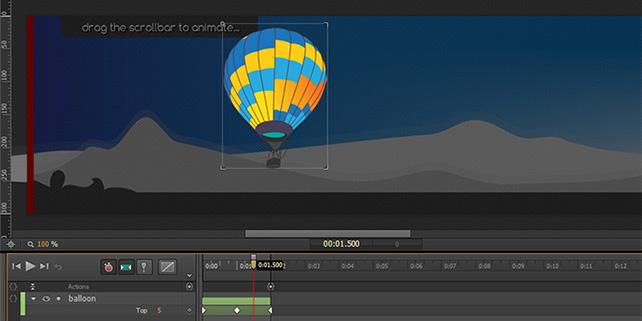
Adobe is discontinuing the Adobe Edge applications. These apps were released three years ago as Adobe looked to create animation and web design tools that supported HTML5 but were different from their existing Flash and Dreamweaver tools. Adobe Edge animate was released for creating HTML5 animation, while Edge Reflow was available as a tool for creating responsive websites. At a time when HTML5 and CSS3 have been fully embraced across all web browsers, it might appear odd that Adobe is discontinuing these apps. While the Edge products are being discontinued, Adobe has indicated that they plan to make the same functionality from the Edge applications available in different programs. American Graphics Institute will be updating Adobe CC Creative Cloud classes and individual Dreamweaver courses and Adobe Flash (Animate) classes once Adobe rolls-out these changes. The changes that are coming to these apps are described below.

Adobe Edge Animate becomes Adobe Animate

Adobe Edge Animate will be retired and most of its capabilities will be integrated into the product currently known as Flash. But along with this change, Adobe Flash will be renamed Adobe Animate as they refocus on the core animation capabilities along with more recently added HTML5 export functions from Flash. In an effort to overcome the poor reputation of the Flash name due to security flaws in the Flash-plug in, Adobe is renaming the product in hopes that they can extend its life. The renamed Adobe Animate will still export to the Flash file format, but Adobe is hopeful that interactive designers will use it to create HTML5 animations and web advertisements.

Adobe Edge Reflow merged into Dreamweaver and Adobe Muse

Adobe is also discontinuing Adobe Reflow which made it possible for designers to create responsive web designs that changed based upon the size of the screen on which they are viewed. Such designs respond to the available screen size, enabling the designer to decide which elements and navigational choices should be available when viewed on a phone, tablet, or desktop device.  Adobe plans to integrate the responsive design capabilities into Dreamweaver as well as Adobe Muse. Adobe will continue to offer these two web design applications. Muse is focused more on the needs of designing a modern website and Dreamweaver provides more under-the-hood options for working with and managing code used on websites.

Adobe Inspect becomes Adobe Device Preview

The final member of the Adobe Edge family that is being discontinued is Adobe Edge Inspect. This app helped to make certain web content worked predictably across different devices such as phones and tablets. The Adobe Edge inspect functionality will be added into Dreamweaver and also Photoshop using Device Preview capability.

A final item being integrated into other Adobe apps is Adobe Brackets, an open source code editor. The functionality from Adobe Brackets will find its way into Dreamweaver as well.

With all these changes Adobe is going all-in with their original web design tools. While Flash gets renamed in an attempt to remove the baggage associated with the security flaws from the Flash file format, Adobe hopes that enough designers will still consider these tools for web design going forward so that they remain relevant. 

About the author

Christopher Smith is president of American Graphics Institute. He is the co-author of Adobe Creative Cloud for Dummies and more than 10 other books on design and digital publishing. He served as publisher and editor of the Digital Classroom book series, which has sold more than one million books on topics relating to InDesign, Photoshop, Illustrator, After Effects, Premiere Pro and other Creative Cloud apps. At American Graphics Institute, he provides strategic technology consulting to marketing professionals, publishers designers, and large technology companies including Google, Apple, Microsoft, and HP. An expert on web analytics and digital marketing, he also delivers Google Analytics classes along with workshops on digital marketing topics. Christopher did his undergraduate studies the at the University of Minnesota, and then worked for Quark, Inc. prior to joining American Graphics Institute where he has worked for more than 20 years.

Footer
  • 781-376-6044
  • CONTACT US
  • SEE ALL AGI TRAINING LOCATIONS

© Copyright 2002 - 2026 American Graphics Institute