

Adobe training, UX Courses, and Photoshop Classes at AGI
American Graphics Institute
Secondary
  • Why AGI
  • About
  • Contact
  • Locations
  • All classes
  • Cart
  • Log in
Search
Search
Main menu
  • Classes & Workshops
    • Classes & Workshops
    • Column 1
      • Adobe Courses
      • Photoshop
      • InDesign
      • Illustrator
      • Premiere Pro
      • After Effects
      • Animate
      • Acrobat
      • Captivate
      • Creative Cloud
      • AI Classes
      • Chat GPT
      • Copilot
      • Claude AI
      • Gemini
      • Animation
      • Motion Graphics
      • After Effects
      • Animate
      • Blender
      • Cinema 4D
      • Maya
      • Digital Marketing
      • Google Analytics
      • Google Tag Manager
      • HTML Email
      • Digital Marketing Certificate
      • Elearning
      • Captivate
      • Camtasia
    • Column 2
      • Figma
      • Figma Introduction
      • Advanced Figma
      • Figma Design Systems
      • Figma Bootcamp
      • Graphic Design Courses
      • Graphic Design Course
      • AI Graphic Design Course
      • Graphic Design Certificate
      • Graphic Design for High School Students
      • Canva
      • Data Visualization
      • Office Skills
      • Excel
      • Power BI
      • PowerPoint
      • Keynote
      • Access
      • Teams
      • Google Docs
      • Presentation Design
      • PowerPoint Design
      • Keynote Presentation Design
    • Column 3
      • UX Courses
      • UX Design
      • UX Research
      • Information Architecture
      • Rapid Prototyping
      • UX for Mobile & Touch
      • Figma
      • UX Certification
      • UX Design Certificate
      • Design Thinking
      • Video Editing Courses
      • Video Production
      • Premiere Pro
      • After Effects
      • DaVinci Resolve
      • Final Cut
      • Video Editing for High School Students
      • Web Accessibility
      • Web Accessibility
      • Section 508
      • Accessibility for Designers
      • InDesign Accessibility
      • MS Office Accessibility
    • Column 4
      • Web Design
      • WordPress Classes
      • HTML
      • CSS
      • Responsive Web Design
      • Web Design Certificate
      • Web Graphics
      • Web Design for High School Students
      • Web Development
      • Agile
      • CSS
      • HTML
      • JavaScript
      • Python
      • WordPress
      • 3D Design
      • 3DS Max
      • After Effects
      • Blender
      • Cinema 4D
      • Maya
      • Motion Graphics
      • Sketchup
      • See All Classes
  • Online Training
    • Online Training
    • Column 1
      • Adobe Classes
      • Photoshop
      • InDesign
      • Illustrator
      • Premiere Pro
      • After Effects
      • Animate
      • Acrobat
      • Captivate
      • XD
      • Creative Cloud
      • All Adobe
      • Digital Marketing
      • HTML Email
      • Google Analytics
      • Google Tag Manager
      • Digital Marketing Certificate
    • Column 2
      • Elearning
      • Captivate
      • Camtasia
      • Graphic Design
      • Graphic Design Course
      • Graphic Design Certificate
      • Design Thinking
      • Office Skills
      • PowerPoint
      • Keynote
      • Excel
      • Access
      • Google Docs
      • Presentation Design
      • PowerPoint Design
      • Keynote Presentation Design
    • Column 3
      • UX Courses
      • UX Design
      • Information Architecture
      • Rapid Prototyping
      • UX for Phone & Touch
      • Figma
      • UX Certification
      • UX Design Certificate
      • Video Editing
      • Premiere Pro
      • After Effects
      • DaVinci Resolve
      • Final Cut
      • Web Accessibility
      • Web Accessibility
      • Section 508
    • Column 4
      • Web Design
      • Web Design Certificate
      • WordPress
      • HTML
      • CSS
      • Responsive Web Design
      • Web Graphics
      • Web Development
      • JavaScript
      • HTML
      • CSS
      • Drupal
      • WordPress
      • CAD & 3D Design
      • Sketchup
      • 3DS
      • Maya
      • See All Classes
  • Certificate Programs
    • Certificate Programs
    • Column 1
      • Graphic Design Certificate
      • Video Editing Certificate
      • Digital Marketing Certificate
    • Column 2
      • UX Design Certificate
      • Web Design Certificate
      • Web Development Certificate
    • Column 3
      • Photoshop Certificate
      • All Certificate Programs
  • Adobe Training
    • Adobe Training
    • Column 1
      • Photoshop
      • InDesign
      • Illustrator
      • Animate
      • Acrobat
    • Column 2
      • Premiere Pro
      • After Effects
      • XD
      • Captivate
      • Connect
    • Column 3
      • Creative Cloud
      • Adobe Express
      • Dreamweaver
      • AEM Forms
      • InCopy
      • All Adobe Classes
      • See All Classes
  • Corporate Training

  • Why AGI
  • About
  • Contact
  • Locations
  • All classes
  • Cart
  • Log in
Breadcrumb
  1. Home
  2. Adobe Classes
  3. After Effects Classes
  4. Pixar Exhibit In Boston a Delight For Digital Artists
Pixar Exhibit in Boston a Delight for Digital Artists
Related Class
Pixar Exhibit in Boston a Delight for Digital Artists
After Effects courses & classes
Related Articles
Image
Computer displaying an online After Effects course project

Best After Effects Courses for 2026

Image
Adobe After Effects shows the future of animation tools

What is After Effects

Image
Video editing job projections and career outlook

Best Computer for Adobe After Effects 2023

Pixar Exhibit in Boston a Delight for Digital Artists

  • Published on August 18, 2015
by Chris Smith
Image
Pixar Exhibit in Boston a Delight for Digital Artists

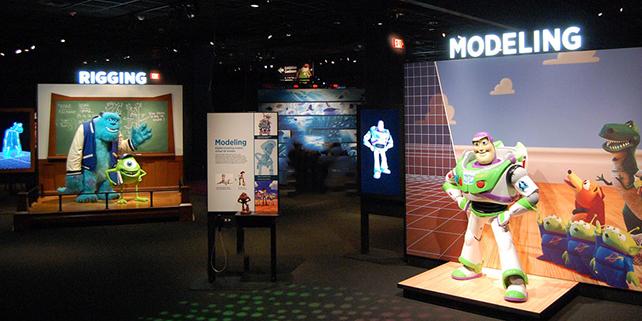
Hollywood has come to Boston once again, but this time with animation and effects. Digital artists that work with tools such as Photoshop and After Effects are likely to find inspiration and fascination at a Pixar exhibit in Boston at the Museum of Science, but children and anyone that likes movies will find it equally interesting. The exhibit is titled the science behind Pixar and provides a fun and interesting look at how science is used to create the computer animated movies that Pixar invented.

Younger generations take for granted the computer animation used in movies such as Toy Story, Cars, and Finding Nemo. Yet at the time these movies were being created, Pixar needed to invent the technology for them to be created. Pixar didn’t simply download a copy of the Creative Cloud and launch an animation or effects app. When they hit a wall they couldn’t simply take an After Effects class. Rather, they needed to figure out how to create software tools that didn’t exist, and build believable effects that were not available on any computer system. And they needed to scale in order to showcase a school of fish in Finding Nemo, or an entire set of toys in a playroom in Toy Story. Pixar needed much or than a simple set of animation tools to make a single object move. They were replacing the hundreds of traditional artists with a new breed of digital artist that understands design, aesthetics, and animation.

At the opening of the exhibit in Boston, one of the founders of Pixar, Ed Catmul, described how Roy Disney, the nephew of Walt Disney, brought Pixar together with Disney and created “an amalgamation of the artists with technical people” which resulted  in a cross-pollination that is still impacting the way the studios work today.

The exhibit shows how math, physics, and code are used to create code that results in dazzling on-screen effects and animation sequences. How parabolas can be used to describe a blade of grass, and how variations can be applied mathematically to make an entire field appear naturally varied. The result is amazing, and even more fascinating is the code that sits behind the calculations that make the movies real.

At the exhibit, each of the steps in the movie creation process is used to explain the science and technology involved.  The process of using animation to bring stories to life, with character animation, lighting, movement, color, and rendering involves more than a few technical steps. Using hands-on exercises that are part of more than 40 different parts to the exhibit, visitors explore first-hand how they can control and manipulate the final result of what is produced on screen.

As part of the show, get a hands-on chance to participate in different aspects of how Brave, Toy Story, Bugs Life, Cars, and Wall-E are created. Whether you are interested in animation or simply someone who enjoys watching movies, this is a fascination behind-the-scenes look at the animation and movie making process.

If you are feeling inspired after seeing the work of Pixar and want to get started in digital video and animation, there are After Effects courses in Boston and Premiere Pro classes in Boston where you can take the first steps to creating your own digital masterpiece.


About the author

Christopher Smith is president of American Graphics Institute. He is the co-author of Adobe Creative Cloud for Dummies and more than 10 other books on design and digital publishing. He served as publisher and editor of the Digital Classroom book series, which has sold more than one million books on topics relating to InDesign, Photoshop, Illustrator, After Effects, Premiere Pro and other Creative Cloud apps. At American Graphics Institute, he provides strategic technology consulting to marketing professionals, publishers designers, and large technology companies including Google, Apple, Microsoft, and HP. An expert on web analytics and digital marketing, he also delivers Google Analytics classes along with workshops on digital marketing topics. Christopher did his undergraduate studies the at the University of Minnesota, and then worked for Quark, Inc. prior to joining American Graphics Institute where he has worked for more than 20 years.

Footer
  • 781-376-6044
  • CONTACT US
  • SEE ALL AGI TRAINING LOCATIONS

© Copyright 2002 - 2026 American Graphics Institute