

Adobe training, UX Courses, and Photoshop Classes at AGI
American Graphics Institute
Secondary
  • Why AGI
  • About
  • Contact
  • Locations
  • All classes
  • Cart
  • Log in
Search
Search
Main menu
  • Classes & Workshops
    • Classes & Workshops
    • Column 1
      • Adobe Courses
      • Photoshop
      • InDesign
      • Illustrator
      • Premiere Pro
      • After Effects
      • Animate
      • Acrobat
      • Captivate
      • Creative Cloud
      • AI Classes
      • Chat GPT
      • Copilot
      • Claude AI
      • Gemini
      • Animation
      • Motion Graphics
      • After Effects
      • Animate
      • Blender
      • Cinema 4D
      • Maya
      • Digital Marketing
      • Google Analytics
      • Google Tag Manager
      • HTML Email
      • Digital Marketing Certificate
      • Elearning
      • Captivate
      • Camtasia
    • Column 2
      • Figma
      • Figma Introduction
      • Advanced Figma
      • Figma Design Systems
      • Figma Bootcamp
      • Graphic Design Courses
      • Graphic Design Course
      • AI Graphic Design Course
      • Graphic Design Certificate
      • Graphic Design for High School Students
      • Canva
      • Data Visualization
      • Office Skills
      • Excel
      • Power BI
      • PowerPoint
      • Keynote
      • Access
      • Teams
      • Google Docs
      • Presentation Design
      • PowerPoint Design
      • Keynote Presentation Design
    • Column 3
      • UX Courses
      • UX Design
      • UX Research
      • Information Architecture
      • Rapid Prototyping
      • UX for Mobile & Touch
      • Figma
      • UX Certification
      • UX Design Certificate
      • Design Thinking
      • Video Editing Courses
      • Video Production
      • Premiere Pro
      • After Effects
      • DaVinci Resolve
      • Final Cut
      • Video Editing for High School Students
      • Web Accessibility
      • Web Accessibility
      • Section 508
      • Accessibility for Designers
      • InDesign Accessibility
      • MS Office Accessibility
    • Column 4
      • Web Design
      • WordPress Classes
      • HTML
      • CSS
      • Responsive Web Design
      • Web Design Certificate
      • Web Graphics
      • Web Design for High School Students
      • Web Development
      • Agile
      • CSS
      • HTML
      • JavaScript
      • Python
      • WordPress
      • 3D Design
      • 3DS Max
      • After Effects
      • Blender
      • Cinema 4D
      • Maya
      • Motion Graphics
      • Sketchup
      • See All Classes
  • Online Training
    • Online Training
    • Column 1
      • Adobe Classes
      • Photoshop
      • InDesign
      • Illustrator
      • Premiere Pro
      • After Effects
      • Animate
      • Acrobat
      • Captivate
      • XD
      • Creative Cloud
      • All Adobe
      • Digital Marketing
      • HTML Email
      • Google Analytics
      • Google Tag Manager
      • Digital Marketing Certificate
    • Column 2
      • Elearning
      • Captivate
      • Camtasia
      • Graphic Design
      • Graphic Design Course
      • Graphic Design Certificate
      • Design Thinking
      • Office Skills
      • PowerPoint
      • Keynote
      • Excel
      • Access
      • Google Docs
      • Presentation Design
      • PowerPoint Design
      • Keynote Presentation Design
    • Column 3
      • UX Courses
      • UX Design
      • Information Architecture
      • Rapid Prototyping
      • UX for Phone & Touch
      • Figma
      • UX Certification
      • UX Design Certificate
      • Video Editing
      • Premiere Pro
      • After Effects
      • DaVinci Resolve
      • Final Cut
      • Web Accessibility
      • Web Accessibility
      • Section 508
    • Column 4
      • Web Design
      • Web Design Certificate
      • WordPress
      • HTML
      • CSS
      • Responsive Web Design
      • Web Graphics
      • Web Development
      • JavaScript
      • HTML
      • CSS
      • Drupal
      • WordPress
      • CAD & 3D Design
      • Sketchup
      • 3DS
      • Maya
      • See All Classes
  • Certificate Programs
    • Certificate Programs
    • Column 1
      • AI Certificate
      • Graphic Design Certificate
      • Video Editing Certificate
      • Digital Marketing Certificate
    • Column 2
      • UX Design Certificate
      • Web Design Certificate
      • Web Development Certificate
    • Column 3
      • Photoshop Certificate
      • All Certificate Programs
  • Adobe Training
    • Adobe Training
    • Column 1
      • Photoshop
      • InDesign
      • Illustrator
      • Animate
      • Acrobat
    • Column 2
      • Premiere Pro
      • After Effects
      • XD
      • Captivate
      • Connect
    • Column 3
      • Creative Cloud
      • Adobe Express
      • Dreamweaver
      • AEM Forms
      • InCopy
      • All Adobe Classes
      • See All Classes
  • Corporate Training

  • Why AGI
  • About
  • Contact
  • Locations
  • All classes
  • Cart
  • Log in
Breadcrumb
  1. Home
  2. Adobe Courses & Adobe Training
  3. InDesign Courses and Classes
  4. EBook Reader From Nook Is Full featured Android Tablet
eBook reader from Nook is full-featured Android tablet
Related Class
eBook reader from Nook is full-featured Android tablet
InDesign courses and classes
Related Articles
Image
InDesign classes in Jeffersonville, IN

What is InDesign

Image
InDesign classes in Jeffersonville, IN

10 Best InDesign Courses Online or In-Person

Image
InDesign classes in Jeffersonville, IN

Learn InDesign: Five options for learning InDesign

eBook reader from Nook is full-featured Android tablet

  • Published on August 25, 2014
by Chris Smith
Image
eBook reader from Nook is full-featured Android tablet

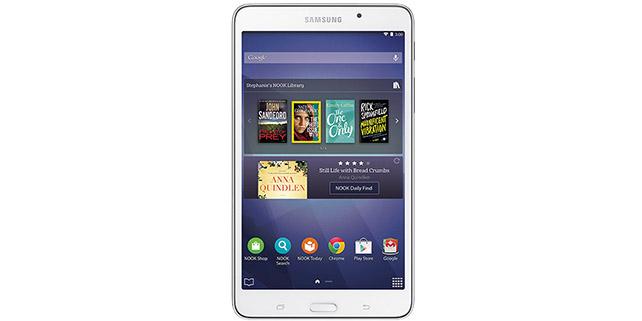
Book retailer Barnes & Noble tried to reinvent their business when they started selling the Nook eBook readers. The initial eBook readers started out as black and white devices for reading text on screen. Later, the retailer expanded into color eBook readers that also provided access to digital magazine and newspaper subscriptions, along with video content with the Nook HD. The latest Samsung Galaxy Tab Nook is the latest step in their digital book business, and is being created by Samsung because Barnes & Noble’s own digital book readers never gained much traction.

Rather than being a bookstore trying to develop new digital devices, they are instead turning their attention to selling and distributing content, and have worked with Samsung to create the next generation of Nook eBook readers. As readers have been able to download ePub files to their iPad or Android tablet, or read digital books on the competing Kindle Fire tablets from Amazon, the Nook quickly became an also-ran in a crowded field of more full-featured tablets. Barnes & Noble announced they are getting out of the business of creating tablets, and the Samsung Galaxy Tab 4 is the first product created from the partnership. Barnes & Noble also announced in June that they intent to separate the Nook digital book business from their traditional stores by early 2015.

Barnes & Noble has committed to buying 1 million Nook devices from Samsung over the next year, and is selling them across their network of 700 retail stores. At $179 the latest Nook tablets are priced a bit higher than the competing Kindle Fire HD from Amazon, yet Nook is offering $200 in free content with each Nook. The devices are more than eBook readers. While the Nook app is front-and-center, this digital book reader is also a full-featured Android tablet. This means that books can be purchased from the Google Play store, and even from the competing Amazon store by downloading the Kindle app. This flexibility, combined with the ability to use most Android apps, and free content may position the latest version of the Nook as a strong contender for those considering a tablet primarily for reading books, magazines, and newspapers.

American Graphics Institute will be testing this latest Nook for the InDesign classes and eBook training we deliver, incorporating anything we learn about requirements for styling, formatting, or creating interactive digital books into the curriculum.

About the author

Christopher Smith is president of American Graphics Institute. He is the co-author of Adobe Creative Cloud for Dummies and more than 10 other books on design and digital publishing. He served as publisher and editor of the Digital Classroom book series, which has sold more than one million books on topics relating to InDesign, Photoshop, Illustrator, After Effects, Premiere Pro and other Creative Cloud apps. At American Graphics Institute, he provides strategic technology consulting to marketing professionals, publishers designers, and large technology companies including Google, Apple, Microsoft, and HP. An expert on web analytics and digital marketing, he also delivers Google Analytics classes along with workshops on digital marketing topics. Christopher did his undergraduate studies the at the University of Minnesota, and then worked for Quark, Inc. prior to joining American Graphics Institute where he has worked for more than 20 years.

Footer
  • 781-376-6044
  • CONTACT US
  • SEE ALL AGI TRAINING LOCATIONS

© Copyright 2002 - 2026 American Graphics Institute