

Adobe training, UX Courses, and Photoshop Classes at AGI
American Graphics Institute
Secondary
  • Why AGI
  • About
  • Contact
  • Locations
  • All classes
  • Cart
  • Log in
Search
Search
Main menu
  • Classes & Workshops
    • Classes & Workshops
    • Column 1
      • Adobe Courses
      • Photoshop
      • InDesign
      • Illustrator
      • Premiere Pro
      • After Effects
      • Animate
      • Acrobat
      • Captivate
      • Creative Cloud
      • AI Classes
      • Chat GPT
      • Copilot
      • Claude AI
      • Gemini
      • Animation
      • Motion Graphics
      • After Effects
      • Animate
      • Blender
      • Cinema 4D
      • Maya
      • Digital Marketing
      • Google Analytics
      • Google Tag Manager
      • HTML Email
      • Digital Marketing Certificate
      • Elearning
      • Captivate
      • Camtasia
    • Column 2
      • Figma
      • Figma Introduction
      • Advanced Figma
      • Figma Design Systems
      • Figma Bootcamp
      • Graphic Design Courses
      • Graphic Design Course
      • AI Graphic Design Course
      • Graphic Design Certificate
      • Graphic Design for High School Students
      • Canva
      • Data Visualization
      • Office Skills
      • Excel
      • Power BI
      • PowerPoint
      • Keynote
      • Access
      • Teams
      • Google Docs
      • Presentation Design
      • PowerPoint Design
      • Keynote Presentation Design
    • Column 3
      • UX Courses
      • UX Design
      • UX Research
      • Information Architecture
      • Rapid Prototyping
      • UX for Mobile & Touch
      • Figma
      • UX Certification
      • UX Design Certificate
      • Design Thinking
      • Video Editing Courses
      • Video Production
      • Premiere Pro
      • After Effects
      • DaVinci Resolve
      • Final Cut
      • Video Editing for High School Students
      • Web Accessibility
      • Web Accessibility
      • Section 508
      • Accessibility for Designers
      • InDesign Accessibility
      • MS Office Accessibility
    • Column 4
      • Web Design
      • WordPress Classes
      • HTML
      • CSS
      • Responsive Web Design
      • Web Design Certificate
      • Web Graphics
      • Web Design for High School Students
      • Web Development
      • Agile
      • CSS
      • HTML
      • JavaScript
      • Python
      • WordPress
      • 3D Design
      • 3DS Max
      • After Effects
      • Blender
      • Cinema 4D
      • Maya
      • Motion Graphics
      • Sketchup
      • See All Classes
  • Online Training
    • Online Training
    • Column 1
      • Adobe Classes
      • Photoshop
      • InDesign
      • Illustrator
      • Premiere Pro
      • After Effects
      • Animate
      • Acrobat
      • Captivate
      • XD
      • Creative Cloud
      • All Adobe
      • Digital Marketing
      • HTML Email
      • Google Analytics
      • Google Tag Manager
      • Digital Marketing Certificate
    • Column 2
      • Elearning
      • Captivate
      • Camtasia
      • Graphic Design
      • Graphic Design Course
      • Graphic Design Certificate
      • Design Thinking
      • Office Skills
      • PowerPoint
      • Keynote
      • Excel
      • Access
      • Google Docs
      • Presentation Design
      • PowerPoint Design
      • Keynote Presentation Design
    • Column 3
      • UX Courses
      • UX Design
      • Information Architecture
      • Rapid Prototyping
      • UX for Phone & Touch
      • Figma
      • UX Certification
      • UX Design Certificate
      • Video Editing
      • Premiere Pro
      • After Effects
      • DaVinci Resolve
      • Final Cut
      • Web Accessibility
      • Web Accessibility
      • Section 508
    • Column 4
      • Web Design
      • Web Design Certificate
      • WordPress
      • HTML
      • CSS
      • Responsive Web Design
      • Web Graphics
      • Web Development
      • JavaScript
      • HTML
      • CSS
      • Drupal
      • WordPress
      • CAD & 3D Design
      • Sketchup
      • 3DS
      • Maya
      • See All Classes
  • Certificate Programs
    • Certificate Programs
    • Column 1
      • Graphic Design Certificate
      • Video Editing Certificate
      • Digital Marketing Certificate
    • Column 2
      • UX Design Certificate
      • Web Design Certificate
      • Web Development Certificate
    • Column 3
      • Photoshop Certificate
      • All Certificate Programs
  • Adobe Training
    • Adobe Training
    • Column 1
      • Photoshop
      • InDesign
      • Illustrator
      • Animate
      • Acrobat
    • Column 2
      • Premiere Pro
      • After Effects
      • XD
      • Captivate
      • Connect
    • Column 3
      • Creative Cloud
      • Adobe Express
      • Dreamweaver
      • AEM Forms
      • InCopy
      • All Adobe Classes
      • See All Classes
  • Corporate Training

  • Why AGI
  • About
  • Contact
  • Locations
  • All classes
  • Cart
  • Log in
Breadcrumb
  1. Home
  2. Design News
  3. InDesign Primary Text Frames
InDesign Primary Text Frames
Related Class
InDesign Primary Text Frames
InDesign courses and classes
Related Articles
Image
InDesign classes in Washington, DC

10 Best InDesign Courses Online or In-Person

Image
What is InDesign

What is InDesign

Image
What is InDesign

Learn InDesign: Five options for learning InDesign

InDesign Primary Text Frames

  • Published on June 2, 2021
by Chris Smith
Image
InDesign Primary Text Frames

Understanding InDesign Primary Text Frames

InDesign’s primary text frame makes it easier for designers to change the appearance of a page layout without needing to manually rearrange text across multiple pages. Without a primary text frame if a designer changes the layout of a page that contains text, the existing layout needs to be manually repositioned so that it follows the new layout.  A primary text frame automatically flows text from the design used in one master page to the design used in another without manual intervention. A primary text frame can also be used to automatically add or remove pages from an InDesign layout

When to use an InDesign Primary Text Frame

If the text of a document is being edited or created using InDesign, a primary text frame is essential. It adds pages as needed, when more text is typed. A primary text frame also removes pages when text is deleted. A document that follows a simple text flow, with a story or article continuing from one page to another, is a good choice for a primary text frame.  Yet a primary text frame can also be helpful with a complex layout that is still being decided. Using a primary text frame enables the designer to switch from one master page to another, trying different designs, without needing to revise the text flow.

How to use a Primary Text Frame

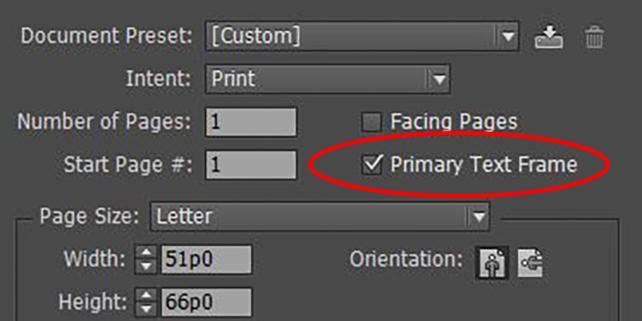
There are several ways to use primary text frames with InDesign. When creating a new document with InDesign, selecting the Primary Text Frame option in the New Document dialog box enables this capability. The default option works for documents that do not have a complex layout.

For more complex layouts that use multiple master pages, on the master page with a text frame, click the Primary Text Frame icon in the upper left corner of the text frame. The Primary Text Frame icon adds an arrow, indicating that it is now a primary text frame. Repeat this process on other master pages for any text frames that should be part of the primary text flow. While there can be multiple Primary Text Frames, there is only one primary text flow per document. This means that the text may flow from one-page design to another, through different boxes that are designated to be part of the primary text frame. Yet only one flow of text, or one story, per InDesign document will flow through the primary text frames.

Learning to use Primary Text Frames

American Graphics Institute teaches how to use primary text frames as part of the public InDesign training courses offered in multiple cities and online or find InDesign classes near you. Primary text frames are covered as part of master pages and document setup in the introductory InDesign course.

When Primary Text Frames Don’t Work

At times primary text frames can appear to be broken or not working. This particularly happens with non-traditional layouts such as gate-folds or documents that have multiple pages adjacent to each other. This is merely a limitation to the primary text frame functionality. A primary text frame works well with a standard layout where text flows across traditional spreads in a layout. If the layout becomes more complicated, such as removing the first page of a facing page document, then InDesign is unable to compensate for the anomaly, and the primary text frame no longer functions.

About the author

Christopher Smith is president of American Graphics Institute. He is the co-author of Adobe Creative Cloud for Dummies and more than 10 other books on design and digital publishing. He served as publisher and editor of the Digital Classroom book series, which has sold more than one million books on topics relating to InDesign, Photoshop, Illustrator, After Effects, Premiere Pro and other Creative Cloud apps. At American Graphics Institute, he provides strategic technology consulting to marketing professionals, publishers designers, and large technology companies including Google, Apple, Microsoft, and HP. An expert on web analytics and digital marketing, he also delivers Google Analytics classes along with workshops on digital marketing topics. Christopher did his undergraduate studies the at the University of Minnesota, and then worked for Quark, Inc. prior to joining American Graphics Institute where he has worked for more than 20 years.

Footer
  • 781-376-6044
  • CONTACT US
  • SEE ALL AGI TRAINING LOCATIONS

© Copyright 2002 - 2026 American Graphics Institute