
Adobe training, UX Courses, and Photoshop Classes at AGI
American Graphics Institute
Secondary
  • Why AGI
  • About
  • Contact
  • Locations
  • All classes
  • Cart
  • Log in
Search
Search
Main menu
  • Classes & Workshops
    • Classes & Workshops
    • Column 1
      • Adobe Courses
      • Photoshop
      • InDesign
      • Illustrator
      • Premiere Pro
      • After Effects
      • Animate
      • Acrobat
      • Captivate
      • Creative Cloud
      • AI Classes
      • Chat GPT
      • Copilot
      • Claude AI
      • Gemini
      • Animation
      • Motion Graphics
      • After Effects
      • Animate
      • Blender
      • Cinema 4D
      • Maya
      • Digital Marketing
      • Google Analytics
      • Google Tag Manager
      • HTML Email
      • Digital Marketing Certificate
      • Elearning
      • Captivate
      • Camtasia
    • Column 2
      • Figma
      • Figma Introduction
      • Advanced Figma
      • Figma Design Systems
      • Figma Bootcamp
      • Graphic Design Courses
      • Graphic Design Course
      • AI Graphic Design Course
      • Graphic Design Certificate
      • Graphic Design for High School Students
      • Canva
      • Data Visualization
      • Office Skills
      • Excel
      • Power BI
      • PowerPoint
      • Keynote
      • Access
      • Teams
      • Google Docs
      • Presentation Design
      • PowerPoint Design
      • Keynote Presentation Design
    • Column 3
      • UX Courses
      • UX Design
      • UX Research
      • Information Architecture
      • Rapid Prototyping
      • UX for Mobile & Touch
      • Figma
      • UX Certification
      • UX Design Certificate
      • Design Thinking
      • Video Editing Courses
      • Video Production
      • Premiere Pro
      • After Effects
      • DaVinci Resolve
      • Final Cut
      • Video Editing for High School Students
      • Web Accessibility
      • Web Accessibility
      • Section 508
      • Accessibility for Designers
      • InDesign Accessibility
      • MS Office Accessibility
    • Column 4
      • Web Design
      • WordPress Classes
      • HTML
      • CSS
      • Responsive Web Design
      • Web Design Certificate
      • Web Graphics
      • Web Design for High School Students
      • Web Development
      • Agile
      • CSS
      • HTML
      • JavaScript
      • Python
      • WordPress
      • 3D Design
      • 3DS Max
      • After Effects
      • Blender
      • Cinema 4D
      • Maya
      • Motion Graphics
      • Sketchup
      • See All Classes
  • Online Training
    • Online Training
    • Column 1
      • Adobe Classes
      • Photoshop
      • InDesign
      • Illustrator
      • Premiere Pro
      • After Effects
      • Animate
      • Acrobat
      • Captivate
      • XD
      • Creative Cloud
      • All Adobe
      • Digital Marketing
      • HTML Email
      • Google Analytics
      • Google Tag Manager
      • Digital Marketing Certificate
    • Column 2
      • Elearning
      • Captivate
      • Camtasia
      • Graphic Design
      • Graphic Design Course
      • Graphic Design Certificate
      • Design Thinking
      • Office Skills
      • PowerPoint
      • Keynote
      • Excel
      • Access
      • Google Docs
      • Presentation Design
      • PowerPoint Design
      • Keynote Presentation Design
    • Column 3
      • UX Courses
      • UX Design
      • Information Architecture
      • Rapid Prototyping
      • UX for Phone & Touch
      • Figma
      • UX Certification
      • UX Design Certificate
      • Video Editing
      • Premiere Pro
      • After Effects
      • DaVinci Resolve
      • Final Cut
      • Web Accessibility
      • Web Accessibility
      • Section 508
    • Column 4
      • Web Design
      • Web Design Certificate
      • WordPress
      • HTML
      • CSS
      • Responsive Web Design
      • Web Graphics
      • Web Development
      • JavaScript
      • HTML
      • CSS
      • Drupal
      • WordPress
      • CAD & 3D Design
      • Sketchup
      • 3DS
      • Maya
      • See All Classes
  • Certificate Programs
    • Certificate Programs
    • Column 1
      • Graphic Design Certificate
      • Video Editing Certificate
      • Digital Marketing Certificate
    • Column 2
      • UX Design Certificate
      • Web Design Certificate
      • Web Development Certificate
    • Column 3
      • Photoshop Certificate
      • All Certificate Programs
  • Adobe Training
    • Adobe Training
    • Column 1
      • Photoshop
      • InDesign
      • Illustrator
      • Animate
      • Acrobat
    • Column 2
      • Premiere Pro
      • After Effects
      • XD
      • Captivate
      • Connect
    • Column 3
      • Creative Cloud
      • Adobe Express
      • Dreamweaver
      • AEM Forms
      • InCopy
      • All Adobe Classes
      • See All Classes
  • Corporate Training

  • Why AGI
  • About
  • Contact
  • Locations
  • All classes
  • Cart
  • Log in
Breadcrumb
  1. Home
  2. Video Editing Courses
  3. Should You Learn Final Cut or Premiere Pro For Video Editing
Should you learn Final Cut or Premiere Pro for video editing
Related Class
Video editing courses
Related Articles
Image
Video editing courses in Richmond, VA

What is After Effects

Image
Live animation with After Effects

Best Computer for Premiere Pro 2024

Image
Should you learn Final Cut or Premiere Pro for video editing

Video editing job projections and career outlook

Should you learn Final Cut or Premiere Pro for video editing

  • Published on June 8, 2020
by Jennifer Smith
Image
Should you learn Final Cut or Premiere Pro for video editing

Those looking to start into video editing are faced with a choice of whether to learn Final Cut or Premiere Pro for video editing. The debate over which app is best for the work of video editors primarily involves two applications: Apple Final Cut and Adobe Premiere Pro. These have become the most widely used desktop video editing apps. Both have evolved into professional tools with features and capabilities to meet the needs of professional video editors. As we teach both apps in our video editing classes, we're able to help you decide which might be a better choice. Let’s examine how they stack up against each other and whether Premiere Pro or Final Cut is a better investment of your time when considering which app to use and learn.

Final Cut or Premiere Pro on Macs and PCs

Before making any decisions about purchasing an app and learning video editing, be sure to check if it runs on the type of computer you have available, as these applications do not work universally on all computers. You will also want to check if you have enough storage space and a compatible operating system. Both support almost any formats of video, photo, and audio imports.

Apple Final Cut Pro only runs on Mac OS computers and does not run on Windows computers. The most recent version, Final Cut Pro X, requires 3.8 GB of available disk space, 4 GB of RAM, and macOS v10.14.6 or later. These are minimum specifications and it will run better with more RAM memory and storage.

Premiere Pro runs on both Mac OS and Windows computers. For Macs, you need 8 GB of available hard-disk space for installation, 8 GB of RAM, and macOS v10.13 or later. Windows PCs require the same amounts of storage and memory, as well as Microsoft Windows 10 (64-bit) version 1803 or later.

What are the main differences between Final Cut and Premiere Pro

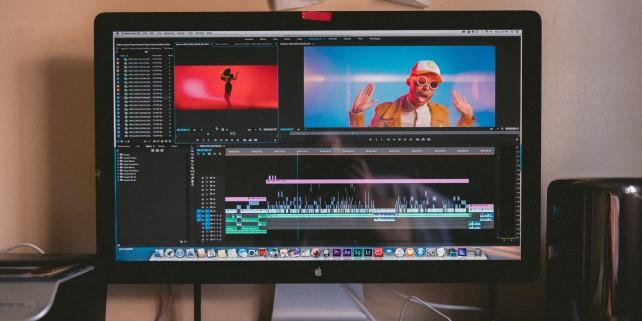
One of the biggest differences between Final Cut and Premiere Pro is their configuration. Premiere Pro uses a traditional nonlinear editor timeline, which can be reconfigured and scaled to suit your needs while working. Final Cut uses a magnetic timeline, which consists of a primary storyline that other workspaces can be attached to.

The traditional timeline used by Premiere Pro consists of tracks and track heads, whereas the magnetic timeline used by Final Cut pro uses lanes that attach to a primary storyline. If you have prior experience using other video editing apps, Premiere Pro might be easier to learn due to its traditional-style workspace. Despite its distinctive format, Final Cut can be learned without too much difficulty if you’re willing to put in some time and effort.

Both apps have their strengths and weaknesses. Final Cut is recognized for its speedy rendering and audio editing capabilities. Premiere Pro has paramount color grading features and can integrate features of other Creative Cloud apps into its projects.

Cost of Final Cut vs. Premiere Pro

Final Cut Pro is offered for a perpetual license. Once you buy it, you own it forever. The price for Final Cut Pro is $299.99. Premiere Pro is licensed on a subscription basis, and you pay either monthly or annually. The cost for Premiere Pro starts at $19.99 per month although it varies depending upon whether you only want Premiere Pro or the entire suite of Adobe Creative Cloud tools.

Is either Premiere Pro or Final Cut better than the other

While professional video editors may have preferences between working with Final Cut or Premiere Pro, both apps provide professional tools and options for video editing. Premiere Pro is better if you need to work on a Windows computer, or have experience in other editing apps, and is more economical if you already have access to the Creative Cloud. Mac users who don’t have either app may prefer to buy Final Cut Pro with a single-time purchase rather than the continual monthly fees of Premiere Pro, and may find the interface more intuitive.

Easier to Learn Premiere Pro or Final Cut

A common question we are asked is whether it is easier to learn Final Cut or Premiere Pro. Fortunately both Final Cut Pro and Premiere Pro are relatively easy to learn. You will find regularly scheduled Premiere Pro classes along with Final Cut courses locally or as live online courses. You'll also find books and tutorials readily available for both apps.

Is Premiere Pro or Final Cut more popular

When looking for video editing work, Premiere Pro is more widely used and is likely to help in landing more opportunities. It is useful to have experience with both apps, as Final Cut is still preferred by many video editors. Knowing both apps is helpful as versatility is always a plus on job applications and may help push your application towards the top of the list.


Written by Morgan Keith


About the author

Christopher Smith is president of American Graphics Institute. He is the co-author of Adobe Creative Cloud for Dummies and more than 10 other books on design and digital publishing. He served as publisher and editor of the Digital Classroom book series, which has sold more than one million books on topics relating to InDesign, Photoshop, Illustrator, After Effects, Premiere Pro and other Creative Cloud apps. At American Graphics Institute, he provides strategic technology consulting to marketing professionals, publishers designers, and large technology companies including Google, Apple, Microsoft, and HP. An expert on web analytics and digital marketing, he also delivers Google Analytics classes along with workshops on digital marketing topics. Christopher did his undergraduate studies the at the University of Minnesota, and then worked for Quark, Inc. prior to joining American Graphics Institute where he has worked for more than 20 years.

Footer
  • 781-376-6044
  • CONTACT US
  • SEE ALL AGI TRAINING LOCATIONS

© Copyright 2002 - 2026 American Graphics Institute