

Learning After Effects
Learn After Effects
We have collected a number of resources to help you learn After Effects. From in-person classes, online courses, free tutorials, and current news, we have gathered what you need for learning After Effects at the schedule, pace, and location that works best for you.
Why learn After Effects
Individuals with After Effects skills have a wider range of career opportunities available to them than video editors alone, and can take on complex projects in the fields of motion graphics and animation, going beyond basic video editing. Freelancers who offer After Effects services relating to motion graphics and animation can attract more clients, and charge higher rates. As a powerful post-production tool, After Effects is used in film, television, and video production for creating professional-quality visual effects and motion graphics. For those interested in learning After Effects, but who are not sure where to start, there are a number of available training resources, including free tutorials, as well as live classes available in-person or online through the American Graphics Institute.
How difficult is it to learn After Effects
While it is moderately difficult to learn After Effects there are several ways to make it easier. The most important element to reduce the difficulty in learning After Effects is to dedicate time with the the right training program. With courses and workshops, you can become skilled at creating motion graphics, animations, and special effects provided you are willing to dedicate the time required to learn. Those just starting to learn After Effects will discover that it has a complex user interface and steep learning curve. These obstacles are overcome by attending live training courses such as those offered at the American Graphic Institute (AGI). A live introductory After Effects course teaches new users how to navigate the interface and create high-quality projects, while a full-week bootcamp provides an intensive course for mastering all aspects of After Effects in a single week. Training courses and consistent, dedicated time to learning makes it much less difficult to learn After Effects, and puts the powerful effects and animation tool within reach of most everyone.
How long does it take to learn After Effects
It takes at least two full days of training to learn the basics of After Effects, and at least two or more days of dedicated training to gain a firm grasp of advanced skills. For those wanting to create simple animations or motion graphics, a two day introductory course is sufficient, while anyone wanting to work on advanced projects with multiple layers of composition and video will need additional advanced training of several more days. Even following training, continuing to spend time practicing and advancing skills is necessary to master After Effects techniques. Training resources like the in-person and online After Effects courses offered by the American Graphics Institute expedite the learning process.
How you can learn After Effects online
There are a variety of online training options available for learning After Effects, the popular motion graphics and visual effects software application. Online training resources provide the chance to learn from instructors with experience in the broadcast, film, and digital media industries. After Effects courses offered by the American Graphics Institute allow students the flexibility of learning from anywhere, and attending either a daytime or evening course. There are options for learning After Effects online that meet various learning styles, schedules, and budgets.
After Effects Certificate and Certification
An After Effects certificate helps demonstrate proficiency and time dedicated to learning this powerful special effects, compositing and animation software. Whether to attract new clients, or stand-out among potential employers, certification can be helpful. Certificates are offered by numerous reputable skill development organizations, including the American Graphics Institute. The courses that provide an After Effects certificate vary in length, cost, and content covered. An After Effects certificate is available for foundational skills, advanced techniques, bootcamps, and multi-week certificate programs. In order to choose the right type of certificate, you should consider your goals for the certificate, the time available to complete a program, and the cost. After Effects certifications are exams offered by testing companies that test skills learned. There is no specific certification exam for After Effects, although there is an exam for motion graphics offered by a third-party testing company. There is no requirement for this exam to work in the motion graphics or effects industry, and the exam is generally not requested or required by employers.
Cost of learning After Effects
The cost of learning After Effects includes more than the cost of a course, as there are subscription fees and technology costs that contribute to the total expenses of learning After Effects. If attending a course in AGI’s classrooms, the app is provided at no cost. If attending online, you can use the no cost trial version of After Effects for the course and for five days. After the trial period, Adobe offers several subscription plans for After Effects, including a monthly and annual plan, along with an all-access plan that includes the ability to use related apps such as Premiere Pro and Photoshop. After Effects requires a computer or laptop with high processing power in order to work efficiently. Although prices for this technology vary, most computers that effectively run After Effects cost $1,000 or more. Those learning After Effects will also want to invest in training, such as online or in-person courses offered by the American Graphics Institute to help learn this complex application more quickly with the guidance of an experienced professional. Fees for small-group, live After Effects courses start at $795 for a multi-day class. There are options available both in-person or online courses.
After Effects Tutorials

After Effects News
Image

Adobe After Effects is a software application for creating motion graphics and special effects used in video, online content and presentations. After Effects is available on both Mac OS and Windows computers. After Effects is used widely in TV and film post-production for the creation of special effects, animation, and video compositing. Projects c...
Image
Adobe After Effects is the leading tool for creating motion graphics and is used by professional animators, video editors, and visual effects artists. After Effects is used to create video, animations, and motion graphics for film, television, commercials, social media, and the web. After Effects is so widely used and important in the film industry...
Image

As the editor of Adobe After Effects Digital Classroom and overseeing more than 50 computers running Adobe After Effects, I’m often asked: what’s the best computer for Adobe After Effects? I also get asked the question: Is a Mac or Windows PC better for After Effects? The answer is that both Mac and Windows computers can be great choices for After ...
Image

If you are a video editors or graphic professional, you likely know that you will benefit from learning After Effects as it is widely used in the creation of many commercials, broadcast promotions, and online videos but may want to know how to learn After Effects. The most common methods for learning After Effects include classes which are availabl...
Image

Anyone working with video, effects, and animation can benefit from learning After Effects, an application that is used in the post-production of television and film, by animators, and anyone needing to create special effects within video. It is used for digital visual effects, motion graphics, tracking, compositing, and animation. After Effects als...
Image
The best way to learn After Effects includes in-person classes, online courses, books, video training, and private lessons. Each individual’s preference for learning methods dictates whether they are better learning After Effects in the classroom or online, with an instructor, or at their own pace. Creative professionals working in fields ran...
Image

The best laptop for After Effects comes from an unlikely source that animation and effects professionals will likely find surprising. After Effects is an extremely processor and graphics intensive application, making it challenging to find a good laptop for After Effects. You might expect the best laptop for After Effects to be from a hardware vend...
Image

Adobe has announced a new app to create animations, which is available as preview version. The new product is Adobe Character Animator, and will be available as part of the Adobe Creative Cloud.
Adobe has a history of providing animation tools, with existing animation tools such as Flash, After Effects, and Edge Animate. Adobe Character Animator...
Image
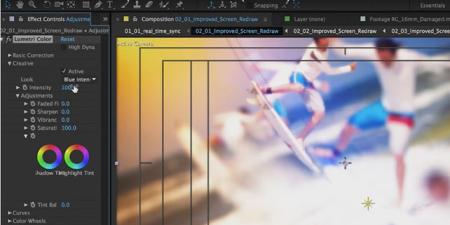
Adobe has released After Effects CC which is a software app used for creating video effects, motion graphics, and compositing video. As American Graphics Institute teaches After Effects classes and the educators at AGI write books on how to use it, we’ve crafted this After Effects review and explanation of new features. The latest versi...